Internal Linking: How to Support Underperforming Pages
To support an underperforming page, I start with relevant links from related pages - not more links everywhere. First, I check that the target page can be indexed, answers the right search queries, and uses the correct canonical URL.
· · 7 min read

On this page
To support an underperforming page, I start with relevant links from related pages - not more links everywhere. First, I check that the target page can be indexed, answers the right search queries, and uses the correct canonical URL.
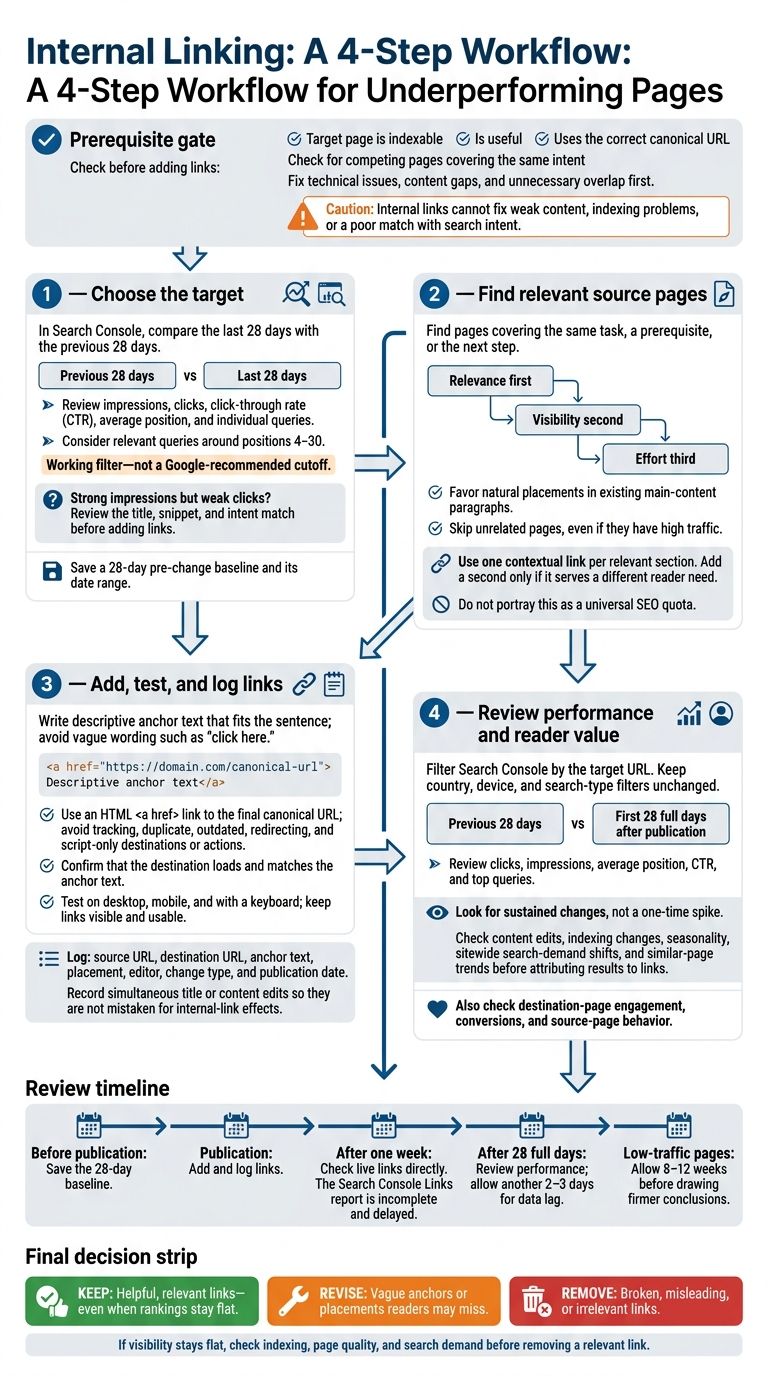
Here’s my approach:
- Choose the target: Check Search Console data and save a 28-day baseline before making changes.
- Find source pages: Pick related content where a link helps readers take the next step.
- Add and test links: Use descriptive anchor text, link to the preferred URL, and log each change.
- Review results: Compare the next 28 full days with the baseline. For low-traffic pages, allow 8–12 weeks before drawing firmer conclusions.
Links can help readers and search engines find a page. But they can’t fix weak content, indexing problems, or a poor match with search intent. I keep useful links even when rankings stay flat - and revise or remove links that confuse readers.
1. Choose Pages Worth Supporting
Find Target Pages in Search Console
Open Google Search Console’s Search results report and compare the last 28 days with the previous 28 days. Review impressions, clicks, click-through rate (CTR), and average position. Then check each candidate URL’s queries: do those searches match what the page answers? Focus on useful pages that support business goals. For each candidate, verify that Google can index it and that another page doesn’t already cover the same intent.
Look for relevant queries ranking around positions 4–30. This is a working filter, not a Google-recommended cutoff. Review individual queries - a page’s average position can hide differences between searches. If impressions are strong but clicks are weak, review the title, snippet, or intent match before adding links.
Use a report that surfaces pages with ranking potential or topical overlap. Treat its suggestions as starting points, not instructions. Check that the target page is useful and that each suggested source page has a natural reason to link to it.
Check Indexability and Internal-Link Coverage
Before mapping internal links, confirm that the target page is indexable and uses the correct canonical. In URL Inspection, check its indexing status and Google-selected canonical. Make sure the intended URL loads successfully, has no blocking directives or noindex tag, and points to the correct canonical. Check again for pages serving the same intent. Fix technical issues, fill information gaps, and address unnecessary overlap before prioritizing link work. Link consistently to the preferred canonical URL.
Start with Links → Internal links to assess the target’s coverage. Then check relevant articles, navigation, and related-content modules for links to it. The report is incomplete and isn’t current, so it won’t show the whole picture. Record source pages, anchor text, and link placements. Prioritize useful, search-relevant pages with few helpful internal links - not pages already linked throughout the site or those with little realistic search demand.
2. Choose Relevant Pages to Link From
Find Link Placements in Existing Content
Once you’ve chosen the target page, find source pages where a link fits naturally. Check your content inventory, site search, and Search Console ranking opportunities for pages covering the same task, a prerequisite, or the next step. Choose pages that add context - not pages that just share a keyword.
Read the surrounding paragraphs before placing a link. Look for a spot in the main content where readers could use more detail or help finishing a task. A link there offers more help than a standalone recommendation at the bottom.
Check older articles during regular content updates, and correct inaccurate wording before adding links. Skip paragraphs already packed with repeated links.
Compare Source Pages and Set Priorities
Compare potential source pages by relevance first, visibility second, and effort third. Check whether each page gets relevant traffic or appears in relevant search results. Then rank pages by how naturally they support the target:
- Put closely related pages with a natural in-content placement first.
- Use high-traffic pages only when they fit the topic.
- Skip unrelated pages, even if they get lots of traffic.
Start with closely related pages that have visibility and cover the target’s topic or a prerequisite. Favor links that fit an existing paragraph over placements that need major rewrites.
Use one contextual link per relevant section. Add a second only if it serves a different reader need. Let usefulness guide your choice - not fixed traffic thresholds or link counts.
Next, write the anchor text and place the link in context.
The First Rule of Internal Linking (That Most SEOs Ignore)
3. Add Contextual Links and Log Changes
Once you’ve chosen the source page, add the link where it gives readers useful context.
Write Clear, Descriptive Anchor Text
Use anchor text that describes the destination and fits naturally into the sentence. Google recommends descriptive wording that relates to both pages - not vague prompts such as “click here.”
Don’t force the same keyword into every link. Adjust the wording to fit each sentence while keeping the destination clear.
Test Links and Record Each Change
Use an HTML <a href> link and point it to the final canonical URL. Avoid tracking, duplicate, outdated, or redirecting URLs. Skip script-only link actions, which crawlers may not follow reliably.
Before publishing, check that the destination loads and matches the anchor text. Test the link on desktop and mobile, confirm it works with a keyboard, and check that it stays visible and easy to use within the surrounding content. Remove repeated links to the same page unless each serves a different reader need.
Log the source URL, destination URL, anchor text, placement, editor, change type, and publication date. Also save the target page’s pre-change Search Console impressions, clicks, average position, and date range. Note any title or content edits made at the same time so you can better separate the effects of internal links from other changes.
After the links go live, monitor Search Console for changes in impressions, clicks, and rankings. You can also use specialized tools to fix site errors identified during your audit.
4. Track Results and Review Links
Compare Search Console Performance Over Time
Once the links are live, return to the target page’s recorded baseline. In Google Search Console, filter by the target URL and compare the first 28 full days after publication with the previous 28 days. Keep the country, device, and search-type filters the same. Review clicks, impressions, average position, CTR, and top queries, and save the baseline view for future comparisons.
Check the live links after one week. Don’t rely on the Links report - it’s incomplete and delayed. Review performance after 28 days, allowing another 2–3 days for data lag. For low-traffic pages, wait 8–12 weeks before drawing firmer conclusions.
Look for steady gains in relevant queries, impressions, and clicks - not a one-time spike. Before crediting internal links, check for content edits, indexing changes, seasonality, sitewide shifts in search demand, and trends on similar pages.
Once you have enough data, decide which links to keep, revise, or remove.
Conclusion: Keep, Revise, or Remove Links
Use the data to judge how links help readers find pages and move through your site, not just how they affect rankings. Check analytics for destination-page engagement, conversions, and source-page behavior. Keep links that help readers, even if rankings don’t move right away.
Revise vague anchor text or placements readers might miss. Remove broken, misleading, or irrelevant links. If visibility stays flat, check indexing, page quality, and search demand before removing a relevant link.
For the next round, choose one promising target page, add its strongest relevant links, document the changes, and schedule a review.
FAQs
Can links from low-traffic pages still help?
Links from low-traffic pages can still help your SEO. When linking to underperforming content, focus on pages on your site that match its topic - not just those that get the most traffic.
Internal links from several relevant pages, even those with modest traffic, help pass authority to the target page and signal its importance to Google.
Should I link related pages in both directions?
Avoid linking related pages to each other when both target the same search query. This can contribute to keyword cannibalization: the pages may swap ranking positions or split authority and traffic, leaving both performing below their potential.
Instead, link from authoritative supporting pages to the main page you want to rank for that keyword. Use two-way links only when the pages meet different search intents and have clearly separate roles in search results.
How can I avoid linking to competing pages on my site?
Keep a keyword map that assigns one URL to each target query. Before publishing content or adding internal links, check the map to confirm which page owns the keyword. Group topics clearly so they don’t overlap.
If two pages compete for the same term, combine them or give each a different search intent. Adding more internal links between them won’t fix the overlap.