How to Avoid & Prevent Keyword Cannibalization
A prevention playbook, not another fix guide — keyword mapping plus a monthly GSC check that catches clashes before they cost you rankings.
· · 7 min read
On this page
Most cannibalization advice is written for people who already have the problem. This isn't that. This is the prevention side: how to plan and maintain a site so two of your pages never end up fighting over the same query in the first place — and how to catch the drift early on the rare occasions it slips through anyway.
How to prevent keyword cannibalization: (1) map one primary keyword and one intent to each URL before you publish; (2) check whether a target already ranks on your site before creating a new page; (3) differentiate intent when topics are close; and (4) run a monthly Search Console check to catch a query that starts bouncing between two pages. Do the first three and you avoid it. Do the fourth and you catch the exceptions while a single edit still fixes them.
What causes keyword cannibalization?
Cannibalization is almost never a mystery — it's the predictable result of publishing without a plan. Four patterns cause the overwhelming majority of cases:
- No keyword-to-URL map. You write a new post targeting a keyword you already cover elsewhere, because nobody was tracking what each URL owns.
- Topic drift. A page written for one query slowly gets edited toward another over months of "quick updates," until it overlaps a neighbour.
- Near-duplicate intent. "Best running shoes" and "top running shoes for beginners" get separate pages when they serve one intent and should have been one.
- Templated pages at scale. E-commerce filters, tag archives, and location pages spin up dozens of near-identical URLs targeting slight variants of the same term.
Every one of these is a planning failure, which is good news: planning failures are preventable. (If the concept itself is new to you, start with what keyword cannibalization is and come back.) To see these patterns play out on real sites, walk through seven keyword cannibalization examples and the fix each one calls for.
The single highest-ROI move: map one keyword per URL
Every prevention guide eventually says "plan your content." Here is the specific version that actually works: before a page exists, assign it one primary keyword and one search intent, and write that assignment down. One keyword, one URL. That map is the contract — no new page ships targeting a term another page already owns.
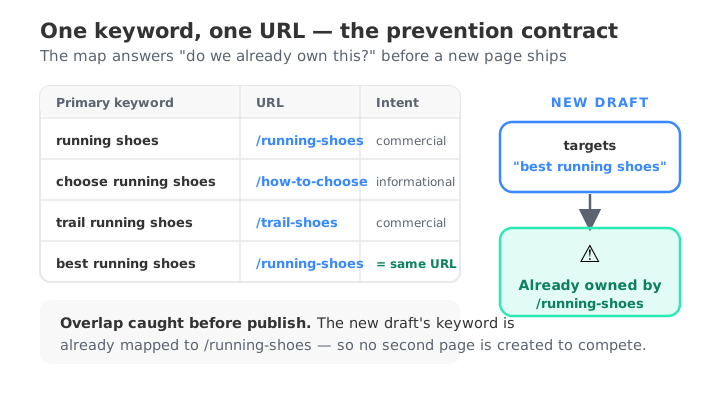
A working map has four columns and lives in a spreadsheet or your CMS:
- Primary keyword — the one term this URL is meant to win.
- Intent — informational, commercial, transactional, navigational. Two pages can share a keyword if their intent genuinely differs (a "running shoes" category page vs. a "how to choose running shoes" guide), but you have to be honest about it.
- URL — the single page that owns that keyword.
- Secondary keywords — the close variants this same page should also cover, so you don't mint a new URL for each synonym.
The map does two jobs. Before you publish, it answers "do we already have a page for this?" in five seconds. After you publish, it's the reference you audit against — any live URL ranking for a keyword the map assigned to a different page is a clash caught early. Keyword mapping is a deep enough tactic that it deserves its own build; when you're ready to construct one from scratch, the step-by-step guide to building a keyword map to prevent cannibalization walks through it column by column.
How do I know if two pages compete?
Two of your URLs sharing a keyword is not automatically a clash. You're looking for a specific signature, and Google Search Console shows it directly. Pull up the Performance → Search results report, filter to a single suspect query, then switch to the Pages tab. If one URL owns the query, you're fine. If two URLs both pull a meaningful, balanced share of that query's impressions at similar positions, they're competing.
One caveat that trips people up: the Average position Search Console reports is an average across every impression in the date range, not a live rank. Two pages can each show an average position of 9 without ever having appeared side by side on the same day. So don't judge on a single number — watch the trend. If the two pages trade the lead week over week, that volatility is the tell. If they hold steady at distinct positions (a firm 3 and a firm 14 that never move), they're ranking twice, not cannibalizing — leave them be. For the full detection walkthrough, see how to check for keyword cannibalization.
Does internal linking cause cannibalization?
Not by itself — but sloppy internal linking makes it worse. Cannibalization is caused by two pages targeting the same intent; internal links then tell Google which of the two you think is most important. The prevention move is to link to the canonical owner with consistent, exact-match anchors. If five posts all link to your "keyword research" guide using the anchor "keyword research," you're concentrating authority on the right URL. If half of them use that anchor to point at a different page, you're actively telling Google two pages deserve the term — you've hand-built a clash. So the rule isn't "link less," it's "link deliberately, and always to the one page the map says owns the keyword."
Is keyword cannibalization always bad?
No — and prevention shouldn't tip into paranoia. Occupying two page-one slots for one query is winning twice, not cannibalizing. A lopsided impression split (one page takes 95%, the other gets a handful Google is just testing) is harmless. Brand queries legitimately surface multiple pages. The cases worth preventing are the ones where two pages each earn a real, roughly balanced share and trade positions — that's where clicks and link equity get split across URLs that should have been one. Prevention is about avoiding those, not about forcing every topic onto a single page regardless of intent.
The monitoring routine: how do I stop cannibalization early?
Even a disciplined team drifts. Pages get edited, new writers join, priorities shift. So prevention has a second half — a lightweight monthly check that catches a new clash while it's small:
- Once a month, scan for queries with two ranking URLs. In Search Console you can do this query by query (filter → Pages tab), but that's slow across a real content library. This is exactly what a keyword cannibalization checker automates: it reads your Search Console data and flags every query where two or more of your pages pull real impression share, so you don't have to guess which queries to check.
- Triage against your map. For each flagged query, confirm it's a genuine balanced-split clash and check which URL the map says should own it.
- Fix small, fix early. A clash caught in month one is usually a one-edit fix — retarget the drifting page, adjust internal anchors, or fold a thin page in. Left for a year, it splits months of accumulated authority and the fix gets riskier. If you do find one that's already entrenched, the full remediation options are in how to find and fix keyword cannibalization.
That's the whole system: map to avoid, monitor to catch, edit to fix. It's far cheaper than the alternative — discovering six months in that your two best posts have been quietly halving each other's rankings.
FAQ
How do I stop keyword cannibalization? Assign one primary keyword and one intent to each URL before publishing, check whether a target already ranks on your site before creating a new page, and run a monthly Search Console check to catch any query that starts bouncing between two pages.
What causes keyword cannibalization? Publishing without a keyword-to-URL map, topic drift from repeated edits, near-duplicate intent across pages, and templated pages (filters, tags, location pages) targeting slight variants of the same term.
Does internal linking cause cannibalization? Internal links don't cause it, but inconsistent anchors make it worse. Point exact-match anchors at the single page that owns each keyword so you concentrate authority on the right URL instead of signalling that two pages deserve the term.
How do I know if two pages compete? Filter Search Console's Performance report to one query, switch to the Pages tab, and look for two URLs pulling a balanced impression share at similar positions that trade the lead over time. Stable, distinct positions mean they're ranking twice, not cannibalizing.
Is keyword cannibalization always bad? No. Two stable page-one rankings or a lopsided split are harmless. Only a balanced, position-swapping clash between two pages genuinely splits your clicks and authority.
Prevention beats remediation every time — but you can only prevent what you can see. Map your keywords, then make the monthly check a habit with a free keyword cannibalization checker so drift never gets the chance to compound.
Check your site free