Bulk Google Index Checker: Find Every Page Google Isn’t Indexing, and Why
Google’s verdict, not a site: guess. We inspect your URLs through the official Search Console URL Inspection API, group every page by the reason Google gives, and rank the groups by the traffic at stake.
Official URL Inspection data, for the Search Console properties you have verified. 100 URLs free, up to 1,500 in the full report.
Run your free index check
We inspect 100 of your URLs with Google’s URL Inspection API, count every group, and work the costliest one in full. Free.
Secure Google sign-in Read-onlyNo passwordNo signup
We only ever read your Search Console data — never write to your account — and you can revoke access anytime.
Free scan on your real Search Console data · a full worked example shown · no account, no card
- Free scan inspects 100 URLs: every group counted, the worst one worked in full
- Google’s evidence per page: coverage state, canonicals, last crawl, robots, sitemap
- Ranked by traffic at stake, so you fix the pages that cost clicks first
How many pages you want in Google aren’t there?
The free check collects your sitemap and Search Console pages, inspects 100 of them with Google’s URL Inspection API (pages that lost traffic first), and counts every page that is in your sitemap or earned traffic but isn’t indexed. Every group gets its count and the traffic at stake; the costliest one comes back in full, with Google’s evidence and the fix.
A sample scan
- 100
- URLs inspected
- 23
- not indexed
- 4,180
- impressions at stake
Worst offender, worked in full
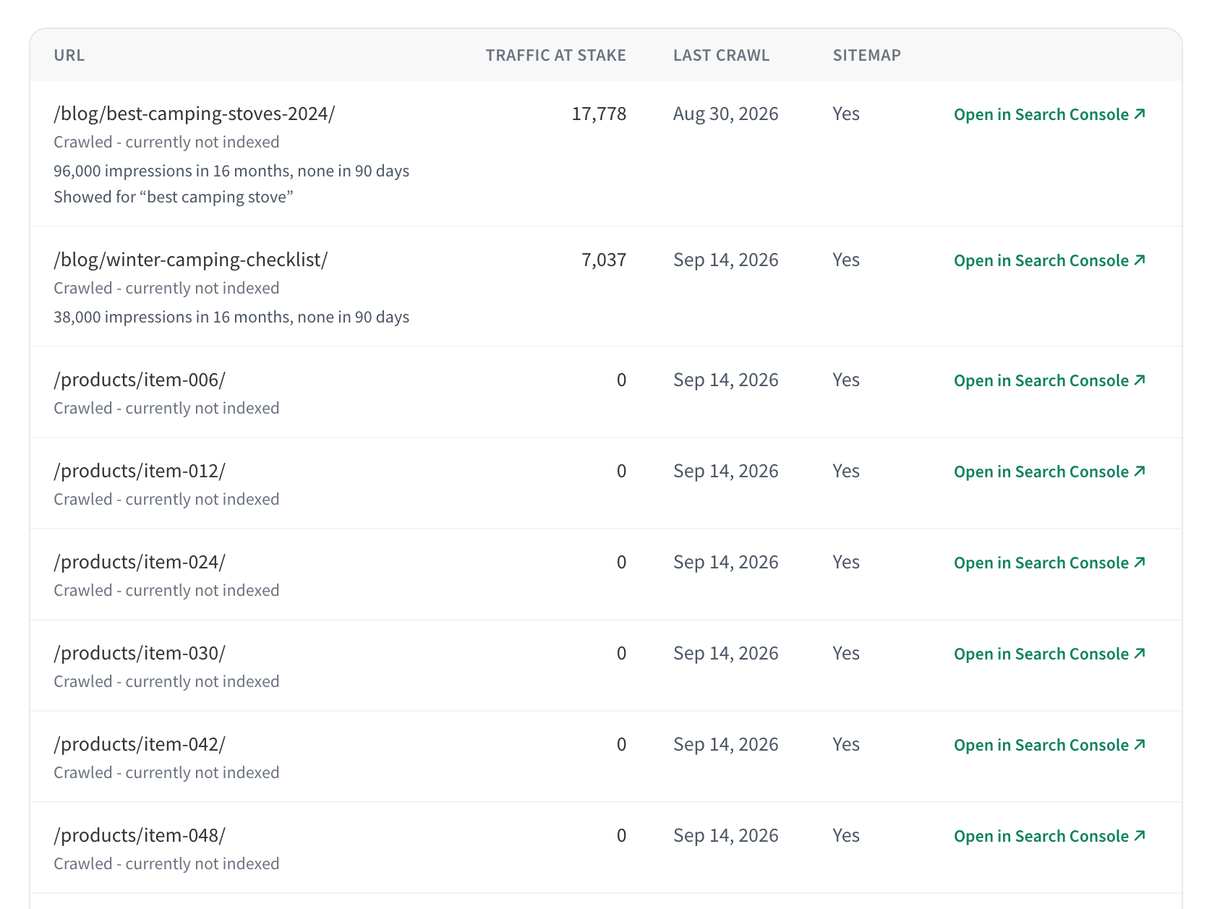
Crawled, currently not indexed: 9 pages, 2 of them earned clicks last year
This is a sample. Your scan shows your own site’s real numbers.
Search Console tells you a page isn’t indexed. It doesn’t tell you which ones matter.
The Page indexing report shows up to 1,000 example URLs per reason, with no traffic attached and no order. A site: search is a rough sample that Google itself says not to rely on.
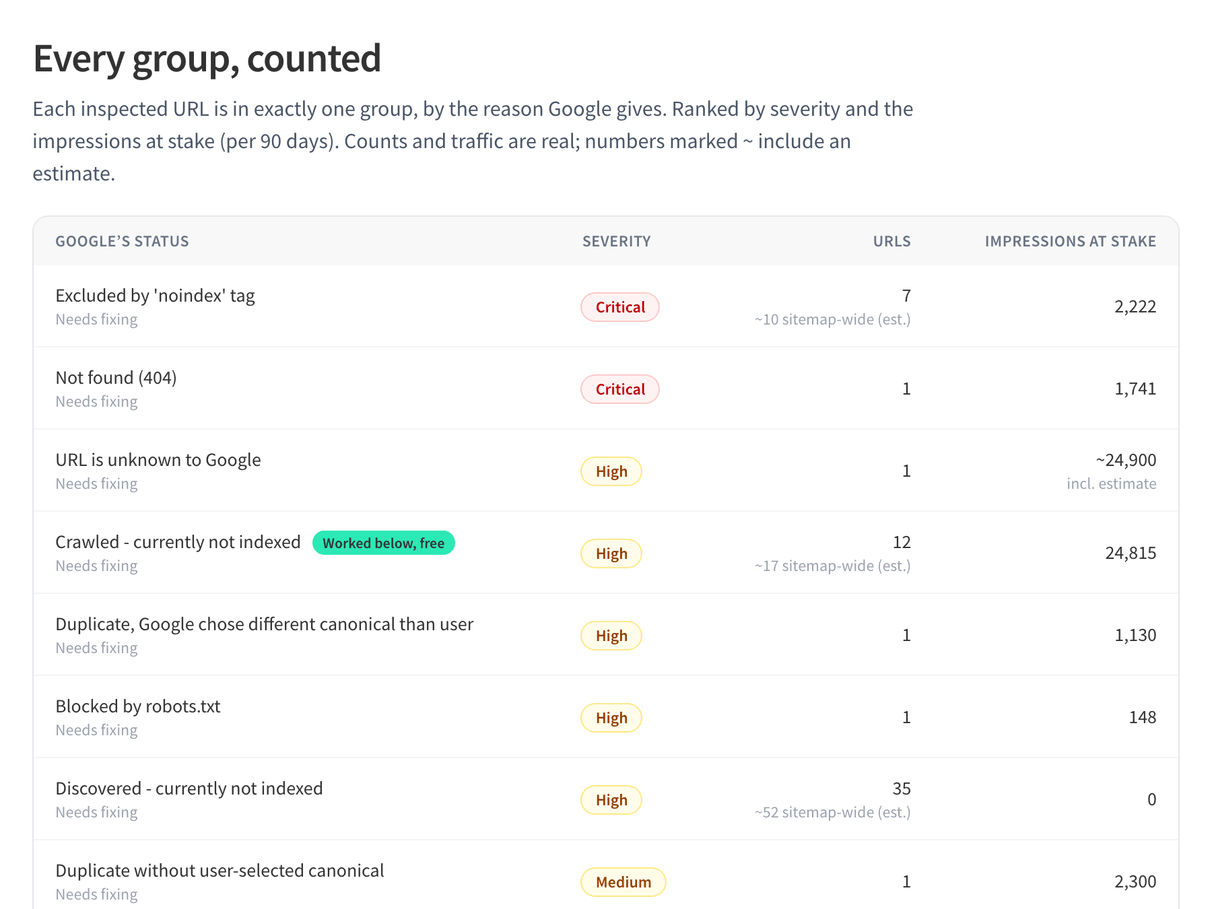
This tool collects your sitemap and Search Console pages, inspects each URL through the official URL Inspection API, and groups the results by Google’s own reason codes plus two cross-checks of ours: indexed pages with no impressions, and pages missing from your sitemap. Every group is ranked by the traffic at stake.
How it works
- 1
Connect Search Console
Sign in with Google, read-only, and pick a verified property. No account, no credit card.
- 2
We collect and inspect your URLs
We read your sitemaps and the pages Search Console reports, pick the URLs that matter most (pages that lost traffic first), and inspect each one through the URL Inspection API.
- 3
See every page grouped by reason
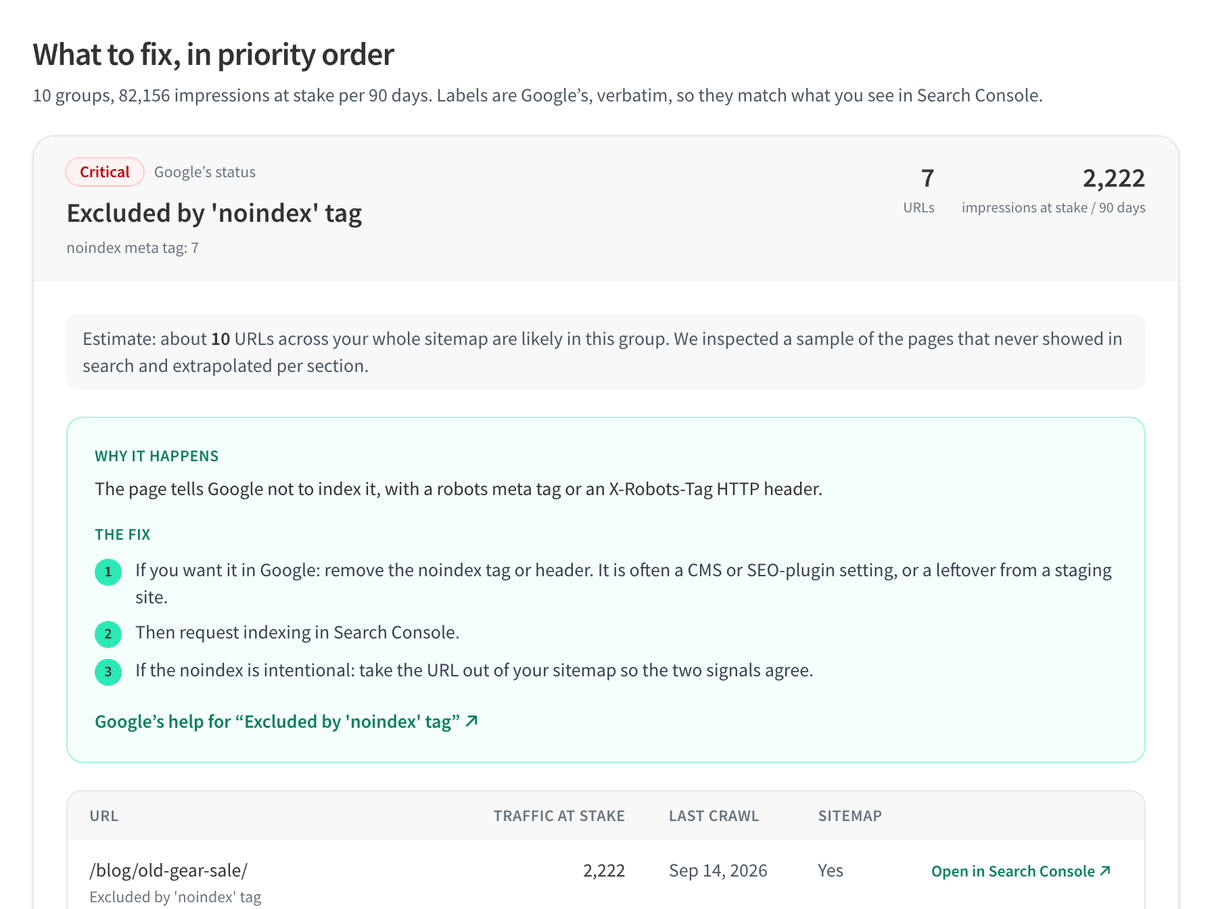
Each URL lands in the group for the reason Google gives, with the fix and the traffic at stake. The worst group comes back in full; unlock every URL, the evidence and the CSV.
What the report looks like
Every row is a URL, Google’s verdict for it, the evidence behind that verdict and the traffic it earned before.
How the check works
The verdicts come from Google, through the URL Inspection API: the same data as the Inspect URL box in Search Console, one request per URL. We add what Google doesn’t: your traffic, the order to work in, and the fix.
Which URLs we inspect
Google allows 2,000 inspections per property per day, so we choose carefully. URLs come from your sitemaps (including sitemap indexes and gzip files) and from the pages in your Search Console performance data. We inspect in this order:
- Pages that earned impressions in the last 16 months but none in the last 3: the ones that quietly dropped out.
- Pages that earn traffic today, as a health check.
- Sitemap pages that never showed in search, sampled evenly across your site sections and extrapolated.
Google’s reason, grouped
Each URL is grouped by the coverage state Google returns (crawled but not indexed, discovered but not indexed, noindex, soft 404, blocked by robots.txt, redirect, duplicate or canonical issues, and more). For pages Google doesn’t know at all, we fetch the page ourselves to tell you whether it errors, redirects or is blocked.
Canonical cross-check
We compare the canonical you declare with the one Google chose, after normalising both, and flag the pages where Google picked a different URL.
Traffic at stake
Each page carries the impressions and clicks it earned in Search Console. Groups are ranked by that, so the pages that cost you traffic come first.
Why not use the Page indexing report or a site: search?
Both are free. Neither tells you which unindexed pages cost traffic, or what to fix first.
| This tool | Manual GSC analysis | Crawl-based checkers | |
|---|---|---|---|
| Data source | Google’s URL Inspection API, one verdict per URL | Page indexing report: up to 1,000 example URLs per reason | site: searches or a crawl: a guess, not Google’s verdict |
| Traffic per page | Impressions and clicks from your Search Console data | Not shown in the report | Not available |
| Priority order | Groups and pages ranked by traffic at stake | You decide | A list of URLs |
| Canonical mismatches | Declared vs Google-selected, compared for every URL | One URL at a time in Inspect URL | Declared canonical only |
| Fix steps | Cause and fix for every group | Help articles | Generic advice, if any |
Frequently asked questions
Is this Google index checker free?
Yes. The free scan inspects 100 URLs of your property and shows the count for every group, the traffic at stake, the worst group worked in full and the first 3 URLs of every other group. A one-time payment unlocks the full run of up to 1,500 URLs, every URL with its evidence, and the CSV.
How do I check if a page is indexed by Google?
For one page, paste it into the Inspect URL box in Google Search Console: it shows whether the page is on Google and why. For many pages at once, this tool runs the same inspection through the URL Inspection API and groups the results by reason.
Can I check indexing for many URLs at once?
Yes, that is what the tool is for. It reads your sitemaps and Search Console pages and inspects up to 100 URLs free, or up to 1,500 in the full run.
How is this different from a site: search?
A site: search shows a sample of what Google has indexed, and Google says it is not a complete list. This tool asks Google about each URL through the URL Inspection API and gets the actual verdict and reason.
How is this different from Search Console’s Page indexing report?
The Page indexing report gives counts per reason and up to 1,000 example URLs, with no traffic attached. This tool inspects your URLs one by one, attaches the impressions and clicks each page earned, and ranks the groups so you know where to start.
Does it use the URL Inspection API?
Yes. Every verdict comes from Google’s official Search Console URL Inspection API, read with the read-only access you grant when you sign in.
How many URLs can it check?
Google allows 2,000 URL inspections per property per day. The free scan uses 100 of them and the full run up to 1,500. If the daily limit runs out mid-run, you get a partial report and can resume the next day: URLs already inspected are reused, not inspected again.
Does it find pages with a noindex tag?
Yes. Pages excluded by a noindex meta tag or X-Robots-Tag header get their own group, and we flag the ones that are in your sitemap or used to earn traffic, since those are usually mistakes.
Can it request indexing for me?
No. Neither Google API offers “Request indexing” for ordinary pages; that button exists only in Search Console. Google’s Indexing API is limited to job posting and livestream pages. The report tells you which pages to fix and resubmit.
Can I check backlinks or a competitor’s pages?
No. The URL Inspection API only answers for properties you have verified in Search Console, so the tool checks your own sites only.
Why is my page “Crawled – currently not indexed”?
Google fetched the page and decided not to index it for now, usually because it judged the page thin, duplicate or low in value compared with others on your site. Improving the content and the internal links to it is the usual fix.
Is my data safe? What does it access?
Your Google access is read-only and your tokens stay in an encrypted session only for the scan, never in our database. Inspection results are cached encrypted for 24 hours so a resume does not use your quota twice, and paid reports are kept 90 days before automatic deletion.
Trusted by SEOs
“Keylogs gives me more actionable insights than Semrush and the like! It definitely helps me and my team a lot.”
 Flavio Amielfrom Guiajando · Guiajando
“This is how search insight should look like — a real time saver when it comes to SEO.”
 Loukman Nacikfrom bounceless.io · bounceless.io
Find the pages Google isn’t indexing.
Free scan on your real Search Console property, 100 URLs inspected, the worst group worked in full. Sign in with Google, read-only, no account, no card.