What Is Keyword Mapping? (and How It Prevents Cannibalization)
What keyword mapping is, a five-column template, a real example from this blog, and how a maintained map stops your pages from competing for the same query.
Written by Sebastian Kinzlinger, Founder, Keylogs
· · 8 min read
Definition
Keyword mapping is the practice of assigning each target keyword to exactly one URL on your site, recorded in a single reference (usually a spreadsheet) where every page has one primary keyword, one search intent and a cluster of secondary terms. It tells you which page owns which query before you write, so no two pages compete.
Key takeaways
- A keyword map gives every URL exactly one primary keyword and one search intent.
- Secondary and long-tail variants belong under an existing page, not on a new one.
- Any keyword mapped to two URLs is a conflict to resolve before you publish.
- Validate the map against Search Console, because plans and live rankings drift apart.
- Checked at planning time, the map prevents cannibalization instead of cleaning it up.
On this page
A keyword map answers one question before you write anything: does a page I already own target this term? It's a plain record — usually a spreadsheet — where each row is a URL with one primary keyword and one search intent. Kept current, it's the cheapest SEO document you'll ever maintain.
To build one: (1) list every URL, (2) assign each a single primary keyword and intent, (3) cluster the secondary terms beneath each primary, (4) flag any keyword assigned to more than one URL, and (5) resolve those conflicts before they ship. That's the whole method — the rest of this post is the detail, a template, a real example, and a way to check the map against reality.
What is keyword mapping?
Keyword mapping is the practice of matching each target keyword to the one URL responsible for ranking for it, documented in a single reference — usually a spreadsheet. Each row is a URL; each URL has exactly one primary keyword, a defined intent (informational, commercial, transactional, navigational), and a short list of secondary keywords it also covers. Done well, the map is a contract: this page owns this term, and no other page is allowed to target it.
How keyword mapping prevents cannibalization
That contract is what makes mapping a prevention tool rather than a documentation chore. Keyword cannibalization happens when two pages target the same query and split its signals. A keyword map makes that structurally hard, because every new page has to be assigned a keyword that isn't already taken — and if it can't be, that's your early warning to differentiate or consolidate before publishing.
This is the tactic the prevention overview in how to avoid keyword cannibalization leans on hardest.
Why cannibalization happens without one
Most cannibalization isn't malicious or even obvious; it's drift. You publish a post this quarter without remembering the one you wrote 18 months ago that covers the same ground. You add a category filter that quietly targets your category's head term. You spin up a landing page whose title overlaps your homepage. In every case the root cause is the same: no one had a single view of which URL owns which term.
A keyword map is that single view. When it's the reference you check before writing a brief, cannibalization stops being something you detect and fix in Search Console months later and becomes something you catch at the planning stage — the cheapest possible place to fix it. A keyword cannibalization checker still matters for catching the drift that slips through, but the map is the prevention layer that means there's far less to catch.
How to build a keyword map, step by step
1. Inventory every URL
Start with a complete list of your indexable pages. Pull them from your CMS, an XML sitemap, or a crawl. Put each URL in its own row. Don't filter yet — you want the full picture, including the old posts and orphaned pages that are the usual cannibalization culprits.
2. Assign one primary keyword and intent per URL
For each URL, decide the single term it should rank for and the intent it serves. "One" is the discipline that does all the work — the moment a page has two primary keywords, it's a candidate to cannibalize a page that should own the second one. Record the intent alongside it, because two pages can share a keyword string without conflicting if their intents genuinely differ (a review vs. a product page), and the intent column is where you'll see that.
3. Cluster secondary keywords beneath each primary
Under each primary, list the secondary and long-tail variations that page also legitimately covers. This is what keeps you from creating a new URL for every close variant — most keyword ideas belong as a secondary on an existing page, not as a new page that would compete with it. The cluster column turns "should this be a new post?" into a question you can answer by looking.
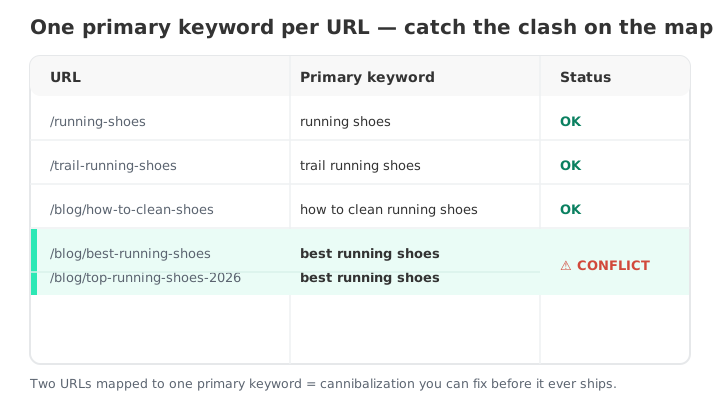
4. Flag every keyword assigned to more than once
Now sort or filter by the primary-keyword column and look for duplicates. Any keyword mapped to two or more URLs is a conflict — a live or latent clash. Highlight them. This single pass over an existing site typically surfaces cannibalization you didn't know you had.
5. Validate the map against live rankings
A map built from intentions is a plan; a map checked against data is the truth. Two URLs you mapped to different keywords may already be competing in the wild, and two you mapped to the same term may not actually be clashing yet. Cross-check by pulling the pages that rank for each primary keyword in Search Console — or run an automated check that reads your GSC data and tells you which of your mapped keywords have two pages splitting impressions right now. That turns your map from a static document into a validated one.
6. Resolve conflicts, then keep the map current
For each flagged conflict, pick a resolution: consolidate the weaker page into the stronger and redirect, differentiate the two by intent, or canonical near-duplicate URLs. Then make the map a living document — add a row every time you plan a page, and check the primary-keyword column before you write the brief. A map that's updated at planning time is what converts it from a cleanup record into a prevention system.
A simple keyword map template
You don't need software. A spreadsheet with these columns covers it:
- URL — the page.
- Primary keyword — exactly one.
- Intent — informational / commercial / transactional / navigational.
- Secondary keywords — the cluster this page also covers.
- Status — OK, or flagged as a conflict to resolve.
Sort by primary keyword whenever you add a row; duplicates jump out immediately. That five-column sheet, kept current, is a more effective anti-cannibalization tool than most paid platforms — because it works before the damage, not after.
A keyword map example
Here's a slice of the map for this blog's own cannibalization cluster. Same topic, four URLs — and no conflict, because each row owns a different query and a different intent:
| URL | Primary keyword | Intent | Status |
|---|---|---|---|
| /blog/what-is-keyword-cannibalization | what is keyword cannibalization | Informational (definition) | OK |
| /blog/how-to-find-and-fix-keyword-cannibalization | fix keyword cannibalization | Informational (how-to) | OK |
| /blog/best-keyword-cannibalization-tools | best keyword cannibalization tools | Commercial (comparison) | OK |
| /keyword-cannibalization-checker | keyword cannibalization checker | Transactional (tool) | OK |
It didn't always look like that. When I ran the duplicate check, two posts were both mapped to "find and fix keyword cannibalization" — the tutorial above and a newer article covering the same steps. Neither had an intent the other lacked, so the newer one was merged into the tutorial and 301-redirected. That's step 6 in practice: one row, one owner.
Does keyword mapping prevent cannibalization?
Yes — it's the most reliable prevention method there is, because it removes the root cause: two pages unknowingly targeting one term. A keyword map won't retroactively fix clashes that already exist (for those you still need to detect and resolve), but as a forward-looking discipline it stops new cannibalization from forming, since every page has to claim a keyword no other page owns. Pair the map with a periodic Search Console check for drift and you've got both halves — prevention and detection — of a cannibalization-proof content operation.
FAQ
What is keyword mapping? Assigning each target keyword to the one URL responsible for ranking for it, recorded in a single reference (usually a spreadsheet) where every URL has exactly one primary keyword, a defined intent, and a cluster of secondary terms.
How do I create a keyword map? Inventory every URL, assign each a single primary keyword and intent, cluster the secondary terms beneath it, flag any keyword mapped to more than one URL as a conflict, validate the map against your live Search Console rankings, and update it before every new page.
Does keyword mapping prevent cannibalization? Yes. Because each page must own a keyword no other page targets, a maintained map prevents new clashes from forming. It won't fix existing ones on its own — combine it with periodic detection to catch drift that slips through.
How often should I update my keyword map? Update it at planning time — add and check a row before writing any new page — and do a full pass whenever you run a content audit or after a large publishing push, so drift is caught while it's still a single-edit fix.
A keyword map is the cheapest insurance in SEO: a spreadsheet that stops you from competing with yourself. Build it, validate it against your real rankings, and check it before you publish — then let the keyword cannibalization checker watch for the drift that no map fully prevents. For the broader prevention routine this tactic sits inside, see how to avoid keyword cannibalization, and to run a manual detection pass, how to check for keyword cannibalization.
Validate your keyword map — free