Merge or Redirect: How to Handle Competing SEO Pages
I merge SEO pages only when they serve the same search intent - not just because they share keywords. If both pages have useful content, I combine it on one URL and add a 301 redirect from the retired page.
Written by Sebastian Kinzlinger, Founder, Keylogs
· 7 min read

On this page
I merge SEO pages only when they serve the same search intent - not just because they share keywords. If both pages have useful content, I combine it on one URL and add a 301 redirect from the retired page.
Here’s how I choose the right fix:
- Keep pages that meet different needs.
- Differentiate pages whose purposes aren’t clear.
- Merge and redirect when both pages answer the same need and have content worth saving.
- Redirect only when one page adds nothing and has a close replacement.
- Canonicalize when a duplicate must stay live. This does not redirect visitors.
Before making changes, I compare queries, clicks, impressions, rankings, and backlinks - not traffic alone. Then I save useful content, publish the surviving page, and test that the retired URL reaches it in one redirect hop.
Finally, I update internal links, the sitemap, and canonical tags, then check indexing and query performance in Google Search Console. A redirect can consolidate signals, but it doesn’t guarantee rankings.
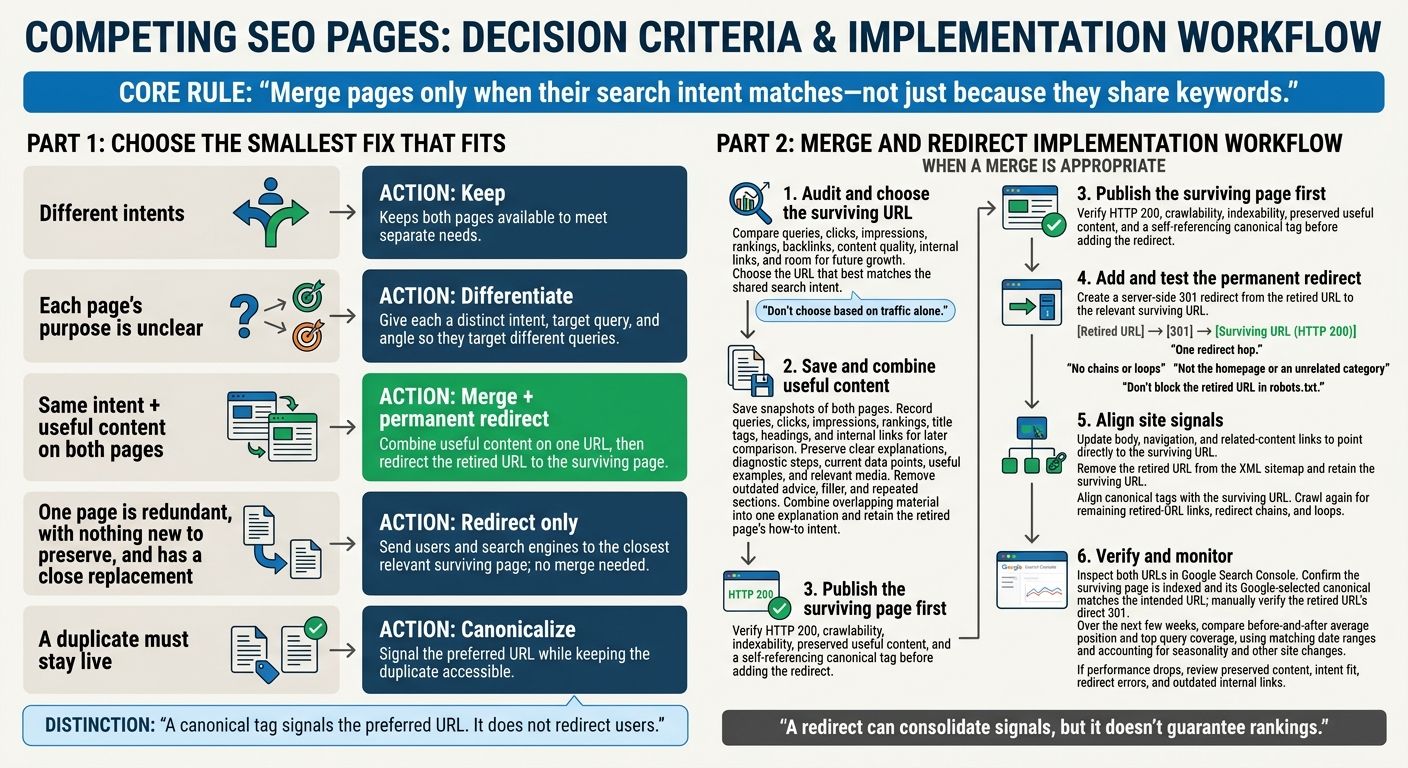
Choose Whether to Keep, Differentiate, Merge, or Redirect
Once you’ve confirmed overlap, choose the smallest fix that fits how the pages relate to each other.
Match the Action to the Page Relationship
Use this yes/no checklist to choose an action. Each “yes” should reflect what the pages actually cover and why they exist.
| Yes/no check | If yes | What the action does |
|---|---|---|
| Do the pages serve different intents? | Keep | Keeps both pages available to meet separate needs. |
| Is each page’s purpose unclear? | Differentiate | Clarifies each page’s scope so they target different queries. |
| Do both pages serve the same intent and contain useful content? | Merge + permanent redirect | Combines useful content on one URL and consolidates ranking signals through a redirect to the surviving page. |
| Is one page redundant, with nothing new to preserve, and does it have a close replacement? | Redirect | Sends users and search engines to the surviving page without merging content. |
| Must a duplicate stay live? | Canonicalize | Signals the preferred URL while keeping the duplicate accessible. |
To differentiate pages, give each a distinct intent, target query, and angle.
A canonical tag signals the preferred URL. It does not redirect users.
Understand How Merges and Redirects Work Together
A merge and a redirect do different jobs: the merge preserves useful content, while the permanent redirect points to the surviving page. Use both when the pages serve the same intent and each has content worth keeping.
If one page is redundant, redirect it to the closest relevant surviving page - no merge needed. If its purpose differs but isn’t clear, differentiate it instead.
Next, choose the surviving URL and save the content worth keeping.
Choose the Surviving URL and Save Useful Content
After the audit, choose the URL that best matches the search intent. Weigh content quality, performance, backlinks, internal links, and room for future growth. Don’t choose based on traffic alone. The surviving URL must meet the retired page’s exact intent and carry the merged content and relevance signals.
Review Content Before Merging
Before editing, save snapshots of both pages and set aside the content worth keeping. Record each URL’s queries, clicks, impressions, and rankings so you can compare results later. Save the title tags, headings, and internal links, too.
Keep clear explanations, diagnostic steps, data points, useful examples, and media that support the retired page’s intent. Check that the data is still current. Keep what helps readers, not filler. Remove outdated advice and repeated sections.
Then rebuild one page around the surviving URL.
Combine the Content Into One Guide
Bring over clearer explanations and diagnostic steps from the retired page. Where the pages overlap, combine the material into one explanation rather than placing two versions back-to-back.
The finished guide must still meet the retired page’s how-to intent. Readers should be able to diagnose the problem and understand what to do next. Record internal links pointing to the retired page so you can update them later.
Publish the Merged Page and Add a Permanent Redirect
Publish the surviving page first. Check that it returns HTTP 200, is crawlable and indexable, and includes the content you kept from the retired page that wasn’t already on the surviving page. Confirm that its canonical tag points to itself. Once the merged content is live, add the redirect.
Redirect the Retired URL to the Surviving Page
Use your CMS, CDN, or server settings to create a server-side permanent 301 redirect from the retired URL to the surviving page. Choose the most relevant surviving URL - not the homepage or an unrelated category.
Test the retired URL. It should reach the surviving page in one hop, without intermediate URLs or loops. Don’t block the retired URL in robots.txt: search engines need to access it to find the redirect.
Update Internal Links, Sitemap, and Canonical
Update links in body copy, navigation, and related-content modules so they point directly to the surviving URL. Remove the retired URL from the XML sitemap and keep the surviving URL listed.
Crawl the site again to find any remaining links to the retired URL, redirect chains, or loops. All signals should point to the surviving URL. After these technical updates, check both URLs in Search Console to confirm the redirect and indexing changes.
Check the Changes and Measure Results
Inspect Both URLs and Track Search Performance
Once the redirect is live, monitor both URLs in Google Search Console. Check that the surviving page is indexed and that its Google-selected canonical matches the intended URL. Manually test the retired URL, too: it should return a direct 301 redirect to the destination, with no intermediate hops. These checks help verify the setup so you can assess whether one page serves the shared intent better than two competing URLs did.
Over the next few weeks, compare Search Console data from before and after the merge. Focus on average position and top query coverage, use matching date ranges, and account for seasonality and other site changes. If rankings fall or key queries disappear, check that useful sections made it into the surviving page. Also review crawl reports for redirect errors and check for internal links that still point to the retired URL.
If performance remains weak, reassess whether the surviving page matches search intent. A permanent redirect consolidates signals, but it doesn’t guarantee stable rankings.
Conclusion: Merge Only When Search Intent Matches
Merge pages only when their search intent matches. Keep them separate when they meet different needs. For redundant pages, move useful content onto one surviving page, redirect the retired URL, and update internal links, sitemaps, and canonicals. Then check indexing and query coverage.
FAQs
How can I confirm two pages are truly competing?
In Google Search Console, filter the Performance report to a single query. Then compare the URLs in the Pages tab week by week. Look for roughly equal impression shares - typically 20% or more each - along with similar ranking positions and pages repeatedly swapping the lead.
Ranking for the same keyword doesn’t automatically mean cannibalization. If both pages hold steady, separate positions, they aren’t cannibalizing each other and don’t need intervention.
How long should I keep a 301 redirect?
Keep the 301 redirect in place permanently so search engines can consolidate ranking signals and pass the retired page’s link equity to the surviving page. Removing the redirect could bring back the original keyword competition if the old URL becomes active again.
Monitor the change for 30 to 60 days to check that search engines have processed it and rankings have stabilized. That’s a monitoring window - not a deadline for removing the redirect. Leave it in place indefinitely.
Can I undo a merge if rankings drop?
Yes, but first check that the pages target the same search intent. If they don’t, a merge may not be needed.
To undo the merge, restore the redirected page at its original URL, remove the 301 redirect, and update internal links to point to the separate pages.
Search engines may take 30 to 60 days to process redirect signals. Reversing a merge won’t restore previous performance right away.