Anonymized Queries vs. Search Console Row Limits
More rows won’t reveal query text Google withholds for privacy. If your Search Console report stops at 1,000 rows, I’d check API pagination or bulk export before blaming anonymization.
· · 7 min read
On this page
More rows won’t reveal query text Google withholds for privacy. If your Search Console report stops at 1,000 rows, I’d check API pagination or bulk export before blaming anonymization.
I separate missing query data into two groups: privacy gaps and retrieval gaps. Here’s the quick comparison:
| What I check | Anonymized queries | Row limits |
|---|---|---|
| Why rows are missing | Google withholds query wording | The access method caps returned rows |
| Can another export help? | No - not with the withheld text | Yes, within the method’s limits |
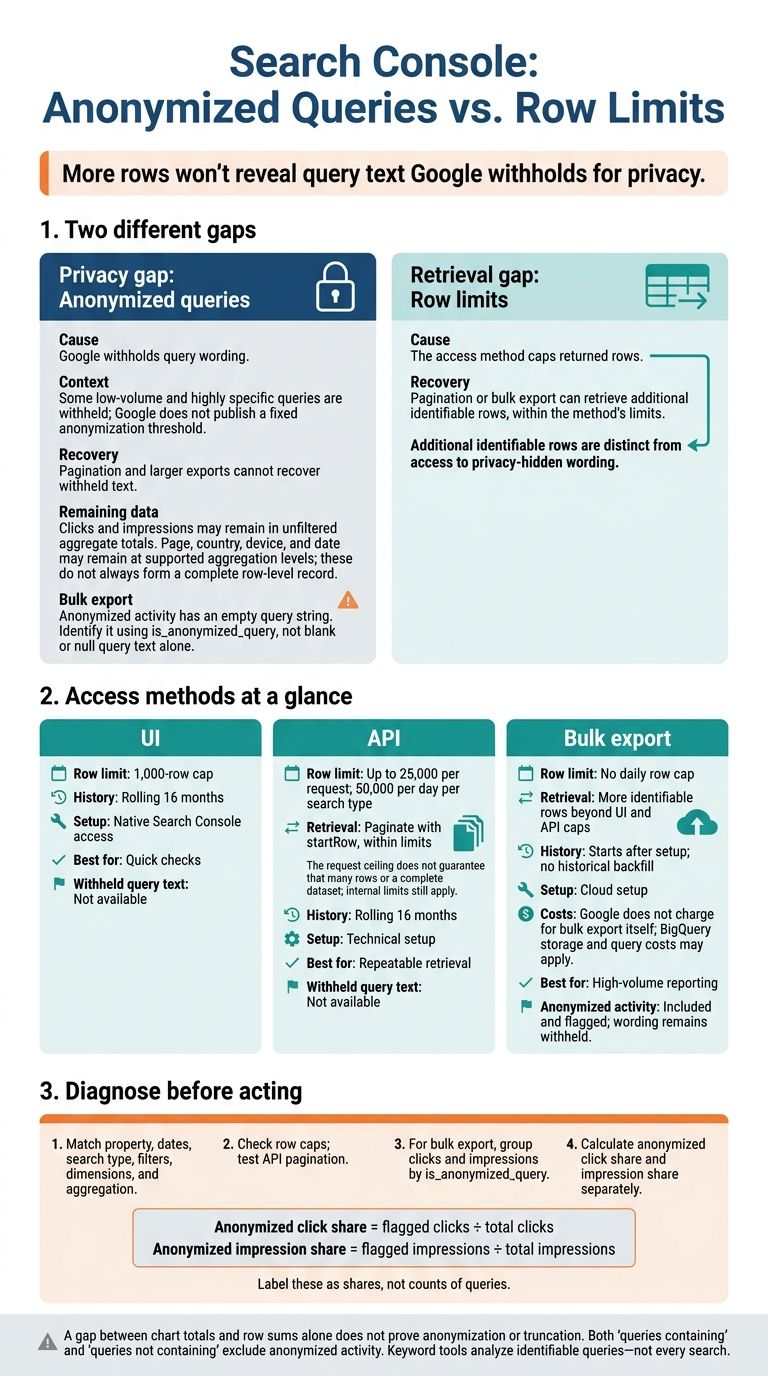
| UI, API, and bulk export | All withhold the wording | UI: 1,000 rows; API: up to 25,000 per request and 50,000 daily per search type; bulk export: no daily row cap |
| How I check | Use the bulk-export anonymization flag | Check caps and paginate API requests |
Before comparing totals, I match dates, filters, and aggregation. A gap alone doesn’t prove anonymization. Query filters exclude anonymized activity, and keyword tools such as Keylogs can assess only identifiable queries.
For high-volume reporting, I’d use bulk export to measure anonymized clicks and impressions separately. It starts after setup, has no historical backfill, and can incur BigQuery costs - but it still cannot reveal withheld wording.
Google Search Console Is Hiding Data From You
Anonymized Queries: What Google Withholds
Google withholds some low-volume and highly specific queries because unusual wording can identify a searcher. Google does not publish a fixed anonymization threshold. This is a privacy gap, not a retrieval gap.
These queries do not appear in the Queries table. Pagination cannot recover them, and Search Console cannot reconstruct their wording.
What Data Remains Without Query Text
Some data may still be available, but availability depends on the report and aggregation level. These dimensions do not always form a complete row-level record.
| Data element | Availability for anonymized activity | Practical use |
|---|---|---|
| Exact query text | Withheld | Cannot support keyword-level analysis |
| Clicks and impressions | May remain in unfiltered aggregate totals | Analyze your search performance |
| Page | May remain at supported aggregation levels | Identify URLs receiving search activity |
| Country | May remain at supported aggregation levels | Review geographic performance |
| Device | May remain at supported aggregation levels | Compare device-level performance |
| Date | May remain at supported aggregation levels | Track performance over time |
Why Query Filters Change Totals
Both “queries containing” and “queries not containing” exclude anonymized activity. Without query wording, neither filter can determine a match. That means filtered totals can fall short of the unfiltered total.
Before interpreting the gap, match the property, dates, search type, page scope, country, device, and aggregation level. Use the gap between unfiltered totals and identifiable query rows as a diagnostic signal - not a count of anonymized queries.
Next, compare this privacy gap with the row limits in the UI, API, and bulk export.
Row Limits Across the UI, API, and Bulk Export
Row caps can keep identifiable queries out of your reports. The UI and API limit how many rows you can retrieve. Bulk export reduces that gap. This is a retrieval issue, not a privacy issue.
UI, API, and Bulk Export Limits
| Feature | UI | API | Bulk export |
|---|---|---|---|
| Row limit | 1,000-row cap | 25,000 per request; 50,000 per day per search type | No daily row cap |
| Setup | Native Search Console access | Technical setup | Cloud setup |
| History | Rolling 16 months | Rolling 16 months | Starts after setup; no backfill |
| Additional identifiable rows | Capped at 1,000 rows | More through pagination, within limits | More identifiable rows beyond UI and API caps |
| Access to withheld query text | No | No | No; anonymized activity is flagged |
API pagination with startRow can help retrieve more rows. But the 25,000-row request ceiling isn't a guarantee of that many rows - or a complete dataset. Internal limits still apply. Bulk export provides more rows, but it doesn't reveal withheld query text.
Bulk Export Includes Anonymized Activity, Not Its Wording
Bulk export records anonymized activity with an empty query string. Use is_anonymized_query to identify it rather than checking for blank or null query text.
Collection begins after setup, with no backfill for earlier history. Set up bulk export before older data leaves the rolling 16-month window.
Your choice depends on whether you need more rows or a better way to view the rows already available.
Choose an Access Method
| Reporting need | Recommended method | Setup effort and costs | Retrieve additional identifiable rows? | Retrieve privacy-hidden text? |
|---|---|---|---|---|
| Quick checks | UI | Low | No, beyond its cap | No |
| Repeatable retrieval | Paginated API | Moderate | Yes, within API limits | No |
| High-volume reporting | Bulk export | High; BigQuery storage and query costs | Yes, beyond UI and API caps | No |
Google doesn't charge for bulk export itself, but BigQuery storage and queries can incur costs. Larger exports address row-cap gaps; they don't recover withheld text.
Before treating missing data as an SEO issue, check whether row caps or anonymization explain the gap.
Check Data Gaps Before Acting on SEO Findings
Before acting on an SEO gap, check whether missing rows stem from truncation or anonymization. Match one property, one date range, one search type, and one filter set. Keep dimensions and aggregation the same across every test so you can compare results.
Match Symptoms to Likely Causes
Use these symptoms to decide what to check.
| Observed symptom | Likely cause |
|---|---|
| Export reaches a row cap | Results may be truncated. |
| Pagination adds rows | The first response left out rows you could retrieve. |
| Adding a query filter changes totals | The filter excludes anonymized activity. |
| Bulk-export rows flagged as anonymized have blank query text | Google withheld the wording for privacy. |
A gap between chart totals and row sums alone cannot tell you whether activity was anonymized or rows were truncated.
Test Retrieval Limits and Measure Anonymized Activity
Check the UI or API row limit, then paginate requests. Change just one variable at a time. Compare chart totals with row sums for both clicks and impressions to measure the gap.
For high-volume properties, group bulk-export clicks and impressions by anonymized status. Keep dates, filters, and aggregation consistent throughout. Divide flagged clicks by total clicks to calculate the anonymized click share. Calculate the impression share separately.
What Keylogs Can Analyze
Tools that read identifiable queries can find issues in the data available to you.
Keylogs analyzes identifiable Search Console queries to detect keyword cannibalization and ranking opportunities. It ranks findings by traffic impact and provides page-level fixes and exportable reports. It cannot recover withheld query text. Before treating “no finding” as proof that no issue exists, check whether a scan cap restricts coverage to top queries by impressions.
For bulk-export rows, check the anonymization flag before interpreting blank query text. When that flag is set, blank query text means the wording was withheld.
Conclusion: More Rows Do Not Reveal Withheld Queries
API pagination and bulk export retrieve more identifiable rows beyond UI caps. But neither reveals query text Google withholds for privacy.
Match the method to the gap. Check filters, aggregation, and retrieval ceilings as part of a Google Search Console audit, then use larger exports when row limits restrict coverage. Track identifiable rows separately from total clicks and impressions.
Treat keyword findings as coverage of identifiable queries, not every search. Missing query wording does not mean zero demand, and a larger export does not mean complete keyword coverage.
FAQs
Can anonymized queries skew my SEO priorities?
Yes. Visible query data doesn't tell the whole story. Relying on it alone can lead you to undervalue content topics or misjudge your reach. Google hides rare queries to protect user privacy, leaving gaps in your long-tail search data.
More complete Search Console exports can reduce gaps caused by row limits. But they can't recover query text that Google withholds for privacy.
How can I separate privacy gaps from retrieval gaps?
Compare the interface data with API-based exports. Retrieval gaps stem from the interface’s 1,000-row limit. The Search Console API can return more rows, and Keylogs uses it to show queries missing from the interface.
Privacy gaps are different. Google withholds rare queries to protect user identity, and even more complete exports can’t recover that query text. As a result, visible query impressions can still add up to less than property-level impressions.
When is bulk export worth the added cost?
For large websites, bulk export can be worth the added cost when the standard interface’s 1,000-row limit leaves out a large share of your ranking keywords. The extra data supports more thorough audits and deeper analysis.
But even a more complete export can’t recover query text Google withholds for privacy, such as rare long-tail queries. Those gaps remain no matter which export method you use.