3 SERP Features That Change CTR at Similar Positions
The same average position can bring different click-through rates. Before I change a page, I check three things around its search listing: AI Overviews, ads, and featured snippets.
· 9 min read

On this page
The same average position can bring different click-through rates. Before I change a page, I check three things around its search listing: AI Overviews, ads, and featured snippets.
I compare the same query-page pairs in Search Console, matching devices, countries, dates, and narrow position ranges, such as 3–5. Then I repeat live SERP checks to see what users encounter before reaching the listing. Those checks add context - not proof of what caused a CTR gap.
Quick Comparison
| SERP feature | What I check | Why it may affect clicks |
|---|---|---|
| AI Overviews | Answer size and whether my page’s citation is visible | Users may get an answer without visiting a page |
| Search ads | Ads above my organic listing | Ads can push the listing farther down without changing organic rank |
| Featured snippets | Who owns the snippet and how much it answers | The answer shown may leave less reason to click |
My rule: check visibility before editing content. Search intent, title relevance, and brand familiarity still matter, so I treat layout as one possible explanation, not the whole answer.
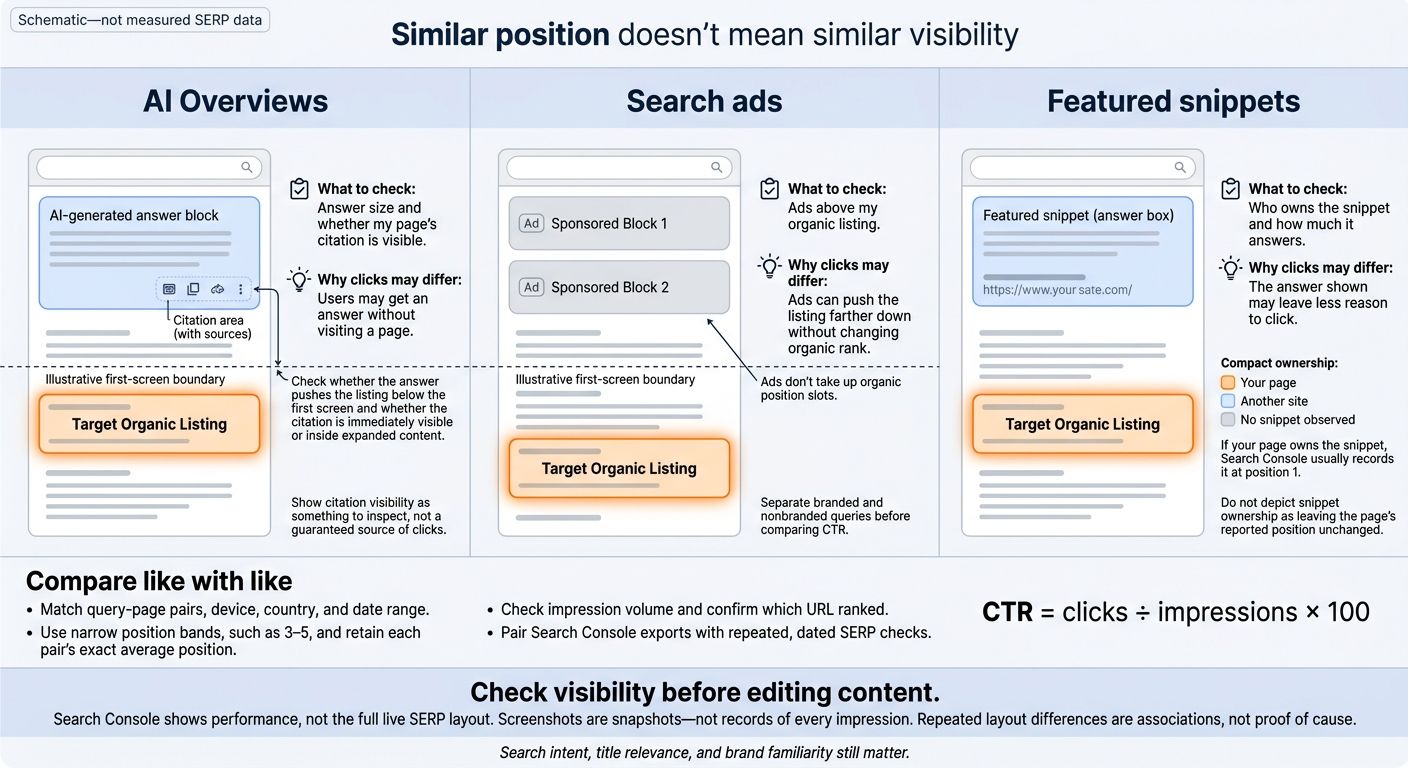
How SERP Features Impact Ranking
Understanding these shifts is the first step to analyze your SEO performance effectively.
What Average Position Means in Search Console
Clicks are visits from Google Search. Impressions count how often your site appears. CTR = clicks ÷ impressions × 100.
Average position averages the highest position your site reached across impressions. Search Console combines ranking observations across queries, devices, and dates. So it’s an aggregate - not a fixed spot. For a property, it uses the highest-ranking result. For a page, it uses that page’s topmost position. Ads don’t take up these position slots, but SERP features can change what users see above or around your organic listing.
Search Console reports rank without showing the full search results page behind those clicks. Two results can have the same average position but very different CTRs because the SERP layout differs.
Compare query-page pairs within the same position band, such as 1–3 or 4–10, while keeping the exact average position for each pair. A period average can hide ranking swings that affect your chances of earning clicks.
Use matching countries, devices, and date ranges, and separate branded searches from nonbranded searches. Record clicks, impressions, CTR, average position, and the ranking URL. Set a minimum impression threshold so small samples don’t skew your reading of the data.
Check which URL ranked throughout the period. If the ranking URL changes, split the query data by URL and date. Otherwise, average position can hide a switch between pages.
The gap between rank and click opportunity is easiest to see when SERP features change what appears above the organic result.
1. AI Overviews
When rankings are similar, check whether the AI Overview fills the first screen.
Organic Visibility
An AI Overview can answer a query above the organic results. Citations can still draw clicks, but they often get less attention when the Overview gives a complete answer.
CTR at Similar Positions
Pew found fewer clicks on organic results when an AI summary appeared. **These were visit-level findings, not position-matched CTR benchmarks.**787211_EN.pdf)
For your own comparison, group queries with similar intent and positions of 3–5. Keep the page, device, U.S. country filter, and 28-day window the same. Export clicks, impressions, CTR, and average position.
Check live SERPs to see whether the Overview pushes the result below the fold or leaves its citation visible.
Manual SERP Checks
Check a sample of queries using the same device and location. Record the Overview’s placement, whether it cites the page, and any ads or other search features. Where you observe both layouts, compare the same query, device, and country with the Overview present versus absent.
Search Console reports clicks and impressions, but it doesn’t show the full live layout behind each impression. Record the live layout alongside the export to put any CTR gap in context.
| Overview present | Average position | CTR | Manual SERP observation | Interpretation |
|---|---|---|---|---|
| Yes; page not cited | Match within 3–5 | From matched export | Does the answer push the listing below the first screen? | Lower CTR may reflect reduced attention |
| Yes; page cited | Match within 3–5 | From matched export | Is the citation immediately visible or inside expanded content? | Citation prominence may affect click opportunity |
| No | Match within 3–5 | From matched export | What appears above the organic listing? | Comparison group, not proof of an Overview’s effect |
2. Search Ads
Ads don’t change organic rank, but they can leave less room for organic results on the page. That means visibility can drop even when average position stays the same.
CTR at Similar Positions
Separate branded and nonbranded queries before comparing CTR. Their search intent and ad pressure differ.
Within each group, compare positions 1–3 when ads appear above the organic result with those same positions when ads don’t. Keep the device, country, and date range the same. A recurring CTR gap is a reason to check the layout - not proof that ads caused it. Manual checks can help you assess whether ad-heavy layouts explain the gap.
Manual SERP Checks
Check the same queries on desktop and mobile as close together in time as possible. Record the query, date and time, country/location, device, organic URL, position, ads above and below the result, ad format, and above-the-fold visibility.
Search Console Reporting Limits
Search Console reports performance, not the live ad layout behind each impression. It also excludes paid clicks and impressions, so don’t mix paid traffic into organic CTR.
| Method | Organic metrics | Ad visibility | Trend use | Query check |
|---|---|---|---|---|
| Search Console | Clicks, impressions, CTR, and average position | No ad counts or placement | Tracks organic performance over time | Identifies queries with CTR gaps |
| Manual SERP checks | No measured clicks or CTR | Shows ad placement, screen space, and above-the-fold visibility | Recorded snapshots only | Checks whether ads leave less visible space for the listing |
3. Featured Snippets
Organic Visibility
A featured snippet displays one source’s answer above the organic results. If your page owns the snippet, Search Console usually records it at position 1. If another site owns it, check how much of the answer users can read before reaching your listing. That change in visibility can shift CTR even when your position stays the same.
CTR at Similar Positions
Compare similar queries at similar positions, with and without a snippet. Owning the snippet doesn’t tell you what CTR to expect. What matters is whether the answer shown satisfies the search. Manual SERP checks help you assess whether the snippet leaves less reason to click or simply appears alongside lower CTR.
Manual SERP Checks
Record who owns the snippet, its format, and how much of the answer is visible.
| Snippet ownership | Format | Organic position to record | How much answer is shown | CTR to record |
|---|---|---|---|---|
| Your page | Paragraph, list, or table | Your page’s reported position | How much your snippet answers | Matched query/page CTR |
| Another site | Paragraph, list, or table | Your page’s reported position | How much the other source answers | Matched query/page CTR |
| No snippet observed | None | Your page’s reported position | Not applicable | Matched query/page CTR |
Search Console Reporting Limits
Search Console reports the outcome, not the full SERP layout behind it. If you notice discrepancies, you can fix site errors with Keylogs to ensure your data is accurate. If CTR drops while position stays flat, use dated SERP checks for the same query, device, and location to assess whether a snippet or another feature is changing visibility.
Combine Search Console Data With SERP Checks
Use Search Console tutorials to spot a CTR gap, then check whether the live SERP layout helps explain it. This workflow lets you test whether AI Overviews, ads, or featured snippets are linked to different CTRs at similar positions.
Export and Segment Search Performance
Export query, page, clicks, impressions, CTR, average position, date, device, and country from Search Console. Compare the same query-page pairs within a narrow position band. Check impression volume before treating a CTR gap as a layout issue.
Search Console shows performance, not the full live layout. Calculate weighted CTR as total clicks ÷ total impressions. Then compare your export with a live SERP check for the same query, device, and location.
Log SERP Features for a Consistent Sample
Choose a fixed sample of high-impression queries with low CTR for their position. Check that same sample using the same device and U.S. location.
Log the date, device type, location, ads, AI Overviews, featured snippets, and organic result order. Save screenshots labeled with the date, device, location, and visible features. Record whether ads appear in each screenshot.
Each screenshot is a snapshot - not a record of every impression. Repeat the sample across dates to make layout changes easier to spot.
Repeat Checks Before Making Changes
Run the same checks on multiple dates before changing titles or content. When the evidence supports an edit, make one targeted change, record the date, and monitor the same query-page pairs afterward.
If impressions grow faster than clicks, CTR falls. Check the SERP layout before changing the page, and treat repeated layout differences as associations - not proof of cause.
Conclusion: Check SERP Layout Alongside Position
Similar position doesn’t mean similar visibility. AI Overviews, ads, and featured snippets can change what users see before they reach organic results. Their effect on CTR isn’t fixed.
Use Search Console to spot gaps, then check live SERPs to help explain them. Before editing a page, compare clicks, impressions, CTR, and position by query, page, device, country, and date range. Pair that export with repeated live SERP checks to distinguish layout effects from page-level issues.
A Search Console tool can help you decide which gaps to check first. Keylogs can prioritize Search Console findings by traffic impact and flag page-level opportunities, but it doesn’t replace manual SERP checks.
FAQs
How often should I check SERP layouts?
Review SERP layouts and performance data monthly. A first check can reveal opportunities to optimize, but a 15-minute monthly review helps you spot ranking shifts, new SERP features affecting click-through rate, and pages losing visibility.
To scale this process, use the Google Search Console API to automate weekly performance checks. Keep reviewing SERPs manually, too, to check for features Search Console doesn’t report.
How much data do I need to trust a CTR gap?
Use at least several weeks of data, ideally the last three months, to spot steady patterns rather than week-to-week noise. Keep filters, date ranges, and grouping methods consistent.
Group queries by average position to build your site’s click-through rate (CTR) curve. Treat a query as underperforming only when its CTR falls well below your site’s curve for that position.
What should I change if SERP features hurt my CTR?
If SERP features lower your CTR while rankings stay steady, don’t assume your page got worse. More impressions may explain the drop. Check whether impressions increased while your average position stayed stable.
Then rewrite the title and meta description for the affected queries. Use searchers’ wording and spell out what readers can expect from the page. Compare CTR before and after the edits using equal date ranges - about four weeks each. Check any other changes in position or impressions separately.