Content Refresh: How to Find Pages Worth Updating
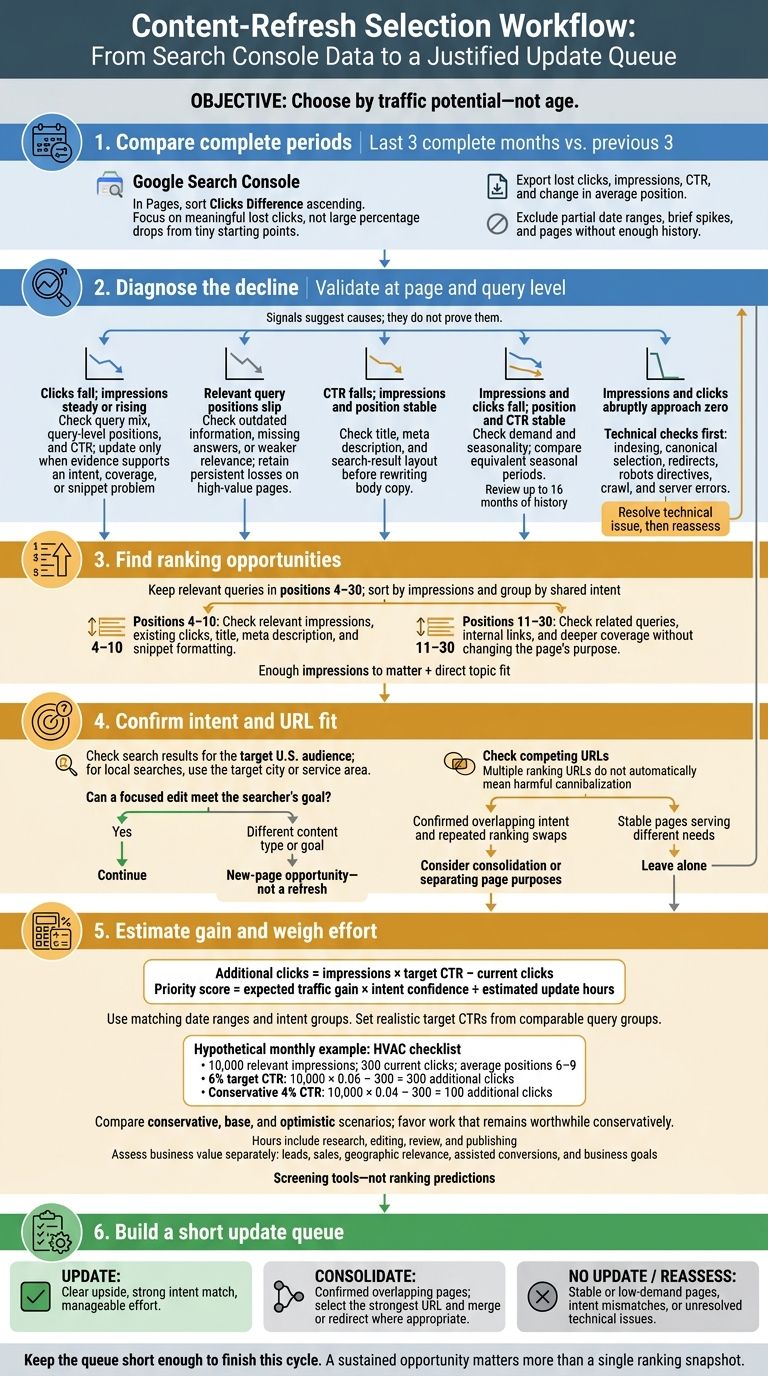
I choose pages to update based on traffic potential - not age. My starting point: compare the last 3 complete months in Google Search Console with the previous 3, then check pages losing clicks and relevant queries ranking in positions 4–30.
· · 9 min read

On this page
I choose pages to update based on traffic potential - not age. My starting point: compare the last 3 complete months in Google Search Console with the previous 3, then check pages losing clicks and relevant queries ranking in positions 4–30.
Here’s how I narrow the list:
- Check the cause. Separate content gaps and falling CTR from seasonal demand or technical issues.
- Match search intent. Confirm that a focused edit can answer what people want, and check for overlapping pages.
- Weigh gain against effort. Estimate added clicks, then factor in confidence, work hours, and business goals.
My goal is a short update queue - not a site-wide rewrite. Fix technical problems first, leave stable pages alone, and prioritize edits that still look worth doing under a conservative estimate.
When should old content be refreshed?
2. Find Pages With Falling Clicks, Rankings, or CTR
Use Search Console’s comparison view to find pages with meaningful traffic, clear losses, and room to improve with a small update. In Pages, sort Clicks Difference in ascending order. Focus on URLs losing meaningful numbers of clicks - not steep percentage drops from tiny starting points. Give extra weight to pages that drive sales, leads, or other high-value actions. Export each URL with its lost clicks, impressions, CTR, and change in average position.
Check What Caused the Decline
For each URL, open the Queries tab and compare the rows. Check whether a few high-value queries account for most of the loss or whether clicks have dropped across many relevant queries.
If clicks fall while impressions stay steady or rise, check query-level positions and CTR. A stable average position can hide losses when the mix of queries changes. If positions and impressions hold steady but CTR falls, review the title, meta description, and current search results before updating the page. Move it forward only when the data points to outdated coverage, a poor match for search intent, or a snippet problem.
Exclude partial date ranges, brief spikes, and pages without enough history. Check whether the decline affects only one device or country. If impressions fall while position and CTR stay steady, compare seasonal patterns before planning an update. Google recommends reviewing up to 16 months of history to understand longer-term patterns.
Match Each Signal to a Next Step
Use the patterns below to choose what to check next. These signals don’t prove a cause on their own. Validate each one at both the page and query level before assigning editorial work.
| Signal | Likely interpretation | Update decision |
|---|---|---|
| Clicks fall; impressions stay steady or rise | Lower CTR, a changed query mix, or losses on important terms | Update only if the page needs better coverage of search intent. |
| Relevant query positions slip | Outdated information, missing answers, or weaker relevance | Update if losses persist on a high-value page. |
| CTR falls; impressions and position stay stable | A less appealing snippet or a changed search-result layout | Check the snippet and results before rewriting body copy. |
| Impressions and clicks fall; position and CTR stay steady | Lower demand or seasonality | Compare equivalent seasonal periods before updating. |
| Impressions and clicks drop abruptly toward zero | A possible indexing, canonical, redirect, crawl, or server issue | Run URL Inspection and technical checks first. |
Record the suspected cause and next action beside each URL. Keep unresolved indexing cases out of the editorial queue. First, check indexing status, canonical selection, redirects, robots directives, and server errors. Once the technical issue is resolved, reassess whether the page still needs an update.
3. Find Queries in Positions 4–30 and Check Intent
After reviewing page-level declines, use query rankings to find pages most likely to regain traffic.
Group Queries by Ranking Opportunity
For each candidate URL, open the Queries report in Google Search Console, turn on Average position, and export the data. Keep relevant queries in positions 4–30 and sort them by impressions. Group queries that share the same intent instead of treating each keyword as a separate opportunity.
Focus on groups with enough impressions to matter and a direct fit with the page’s topic.
| Opportunity type | Average position | What to check | Refresh decision |
|---|---|---|---|
| Page-one opportunity | 4–10 | Relevant impressions, existing clicks, and gaps in the title, meta description, or snippet formatting | Prioritize when a focused edit can improve the snippet and match intent. |
| Page-two opportunity | 11–30 | Related queries and moderate impressions | Keep when internal links or deeper coverage can improve rankings without changing the page’s purpose. |
| Intent mismatch | Any, including 4–30 | A query that calls for a different content type or user goal | Exclude; it needs a different page. |
Next, check that the queries with the most traffic potential match what the page is meant to do.
Check Whether the Page Meets Search Intent
Search those queries for your target U.S. audience. For local searches, use the target city or service area. Compare your page’s purpose with the results Google ranks for each query. High impressions without clicks can point to a mismatch, but check intent before making edits.
Keep the page in your update queue if a focused edit can meet the searcher’s goal. If the query calls for a different content type, treat it as a new-page opportunity - not an update. Record the intent, the exact gap, and whether the existing page can reasonably close it.
Check for Competing URLs on Your Site
When multiple URLs rank for the same query, check whether they overlap. Filter Search Console to an important query, then open Pages to find other URLs getting impressions and clicks.
Multiple ranking URLs don’t automatically mean harmful cannibalization. Look for repeated ranking swaps, pages serving the same purpose, or a less relevant URL pushing out the intended page. Leave stable pages alone when they serve different needs. Consolidate pages, separate their purposes, or choose a preferred URL only when you confirm overlap.
4. Prioritize Pages by Traffic Gain and Effort
Estimate Possible Click Gains
Once a page passes the intent check, rank it by its likely return.
Estimate additional clicks as impressions × target CTR − current clicks. Use the same date range, match query intent, and work from the Search Console metrics you already exported. Set a target CTR based on comparable query groups and realistic ranking outcomes.
Hypothetical monthly estimate: An HVAC checklist has 10,000 relevant impressions, 300 clicks, and queries averaging positions 6–9. A 6% target CTR gives 10,000 × 0.06 − 300 = 300 additional clicks. At a conservative 4% CTR, the gain falls to 100 clicks.
Record the date range, query group, impressions, current clicks, current CTR, current position, target position or CTR, and estimated scope of work. Account for seasonality, shifts in demand, ranking feasibility, and SERP features.
Compare conservative, base, and optimistic scenarios. Favor pages that still look worth the work under the conservative estimate.
Treat the estimate as a screening tool. Before assigning work, check intent, demand, competing URLs, and business value.
Score Candidates by Gain, Confidence, and Hours
Next, weigh the expected gain against your confidence and the time needed.
Priority score = expected traffic gain × intent confidence ÷ estimated update hours. Use this score to compare candidates - not to predict rankings.
Use a fixed confidence scale, with higher scores for pages that clearly match query intent. Include research, editing, review, and publishing in your time estimate.
Assess business value separately. Leads, sales, geographic relevance, assisted conversions, and the page’s role in business goals may justify working on a lower-traffic page first. Use the traffic estimate alongside these factors to decide which pages get editing time.
Candidate Evidence Possible monthly gain* Intent confidence Hours Business-value check Decision and scope HVAC maintenance checklist Declining clicks; related queries rank positions 6–9; sustained impressions 300 clicks High 4 Does it support leads? Update: Revise outdated steps and clarify seasonal maintenance. Overlapping service guides Confirmed intent overlap and repeated ranking swaps across URLs 250 combined clicks High after audit 6 Which URL brings qualified inquiries? Consolidate: Select the strongest URL; merge and redirect others where appropriate. Expired local event page Low rankings and impressions; event ended; no recurring demand 10 clicks Low 1 Does it still serve a current need? No update: Archive, redirect, or remove according to site policy. All figures are hypothetical. For overlapping URLs, estimate combined opportunity once.
5. Conclusion: Build a Short Update Queue
Turn your scored candidates into a short update queue. Keep it short enough to finish this cycle. Choose only pages with clear upside, a strong intent match, and effort your team can handle. Start with the opportunities you’re most confident about.
Track one row per URL, including the query group, date range, estimated click gain, confidence, effort, and decision.
Keep stable, low-demand pages and intent mismatches out of the queue. Revisit them only when a new Search Console comparison shows sustained changes in demand, intent, or rankings. A sustained opportunity matters more than a single ranking snapshot.
FAQs
How much traffic data do I need to prioritize a refresh?
Use at least a few weeks of Google Search Console data. Set the date range to the last three months to spot useful patterns without relying on outdated rankings.
Sort your exported query or page data by impressions to find pages people are searching for. Focus on high-impression candidates ranking in positions 4–30. Use their current click-through rate and distance from page one to pinpoint the biggest potential traffic gains.
How can I spot refresh opportunities on low-traffic pages?
In Google Search Console, find low-traffic pages ranking in positions 4–30 that still get a meaningful number of impressions. These impressions point to search demand for content Google already trusts.
To decide which pages to tackle first, multiply impressions × CTR gap × feasibility. Pages with high impressions but low CTR may just need better titles or meta descriptions. Pages on page two may need more depth, updated facts, and internal links.
How long should I wait before judging a refresh’s results?
Give content updates at least two weeks before assessing ranking changes. After publishing your edits, request indexing through Google Search Console’s URL Inspection tool to help speed up the process. If rankings haven’t changed after two weeks, consider adding three to five internal links pointing to the page.
Click-through rate fixes, like changes to titles or meta descriptions, can show results within days. These updates generally need less time for re-indexing.