Why Does Google Choose Different Canonical URLs?
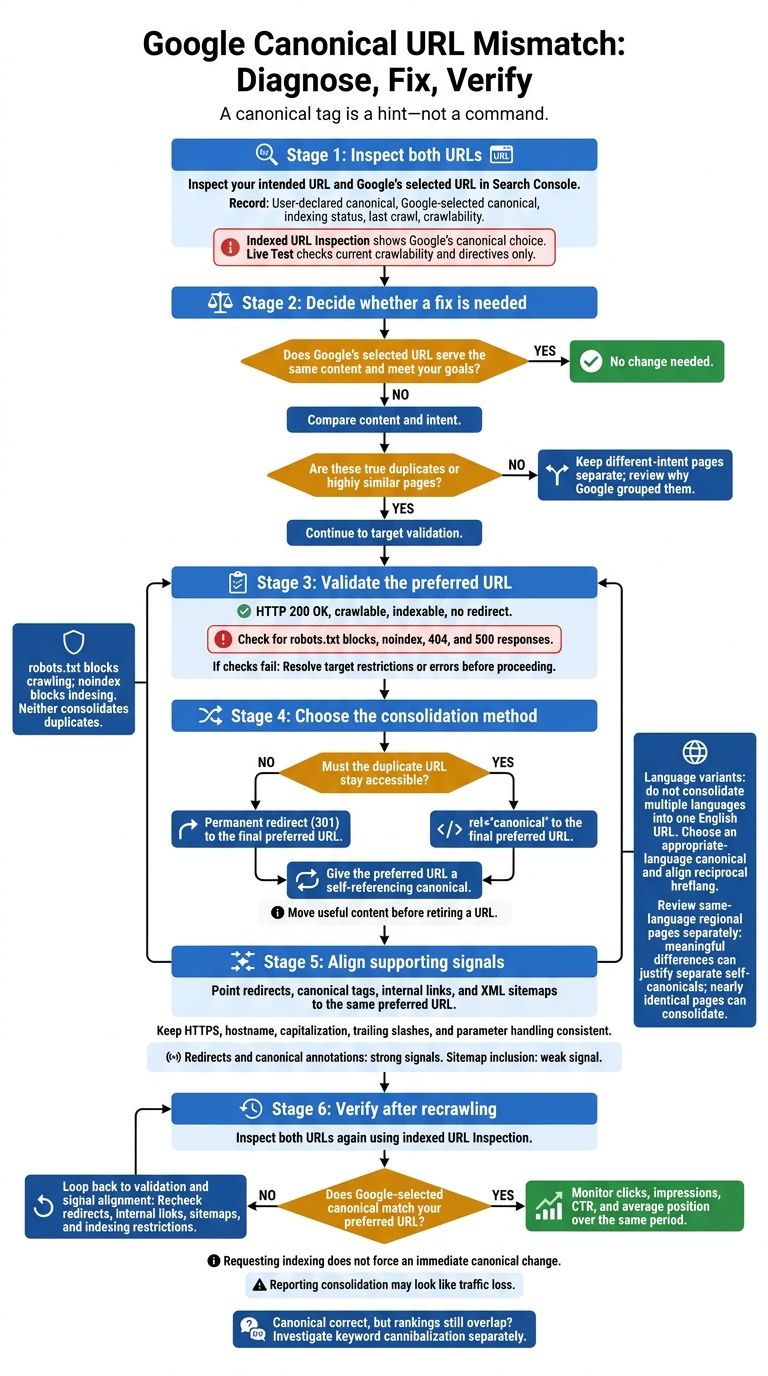
Google can choose a different canonical URL because your canonical tag is a hint - not a command. I start by inspecting both URLs in Search Console, then check whether redirects, internal links, and sitemaps point to the same preferred page.
· 8 min read

On this page
Google can choose a different canonical URL because your canonical tag is a hint - not a command. I start by inspecting both URLs in Search Console, then check whether redirects, internal links, and sitemaps point to the same preferred page.
Here’s my checklist:
- Decide whether a fix is needed. A different URL isn’t a problem if it serves the same content and meets your goals.
- Check the preferred URL. It should return HTTP 200 OK, allow crawling, and be indexable.
- Match the signals. Use a permanent redirect for retired duplicates or a canonical tag for duplicate pages that must stay live. Keep language versions separate and align
hreflang. - Verify after recrawling. I use the indexed URL Inspection result - not Live Test - to check Google’s choice, then review search performance.
The goal isn’t to force every URL into one page. It’s to help Google select the right URL for each set of duplicates. If rankings still overlap afterward, I check for keyword cannibalization separately.
Why Google Selects Another URL
Google usually follows the strongest matching signals - not just the canonical you declare.
Duplicate Content and URL Variants
Tracking parameters and UTMs can give the same page multiple URLs. Google may normalize these variants and select one canonical for search. Check whether each variant changes the content or just creates another address for the same page.
When several URLs serve the same page, Google picks the version with the clearest signals.
Conflicting Redirects, Links, and Sitemaps
Your declared canonical carries less weight when redirects point elsewhere, internal links favor other URLs, or sitemap entries list different versions. Redirects and canonical annotations are strong signals; sitemap inclusion is weaker.
Point redirects, internal links, and sitemap entries to the same URL.
Blocked or Nonindexable Canonical Targets
Your preferred canonical must be crawlable, indexable, and free of redirects, blocks, and noindex tags. If it returns 404 or 500, Google can’t validate its content and may choose another accessible URL instead. Check the target’s HTTP response, not just the canonical tag.
robots.txt blocks crawling; noindex blocks indexing. Neither consolidates duplicates.
Diagnose Canonical Mismatches in Search Console
Inspect Both URLs
Use Search Console to check why Google chose a different URL. In URL Inspection, inspect both your intended URL and Google’s selected URL. Record the User-declared canonical, Google-selected canonical, indexing status, last crawl, and crawlability details.
Use the indexed URL Inspection result to see Google’s canonical choice. Use Live Test only to check current crawlability and directives.
Compare the pages’ content, HTTP responses, canonical annotations, redirect destinations, and robots directives. This helps you determine whether Google grouped duplicate pages or pages that serve different intents. Check performance for Google’s selected URL, too. If the mismatch appears genuine, open the indexing report and compare the signals to diagnose the issue.
Decide Whether the Mismatch Needs a Fix
Treat statuses in the Page Indexing report as diagnostic clues, not verdicts. A mismatch needs a fix only when it changes which URL should represent the page - for example, when the wrong URL gets visibility or Google groups pages that serve different intents.
If Google’s selected URL serves the same content and meets your goals, leave it unchanged. This check tells you whether to adjust your signals or make no change.
Compare Canonical Signals and Indexing Restrictions
Use this checklist to compare the signals that can affect Google’s choice. Which signal points most strongly to your intended URL?
| Signal or restriction | What Google reads from it | Role and appropriate use | What to check |
|---|---|---|---|
| Permanent redirect | The URL has moved permanently. | Strong signal; merge redundant content or retire old URLs | Destination, HTTP status, chains, and loops |
rel="canonical" | Preferred version of duplicate pages | Strong signal; consolidate duplicates that must stay live | Target’s indexability and content equivalence |
| XML sitemap | URLs preferred for discovery | Weak signal; list intended canonicals | Include canonical URLs; exclude non-canonicals |
| Internal links | Which URL the site favors | Supporting signal; align site structure with the intended URL | Anchor text and links to the canonical version |
| HTTPS | Secure version preferred over HTTP | Preference signal; favor secure URLs | Canonicals, redirects, and links point to HTTPS |
robots.txt | Block crawling. | Crawl restriction; manage crawling | Disallow directives on the canonical or duplicates |
noindex | Exclude from indexing. | Indexing restriction; remove pages from search | Meta tags and X-Robots-Tag headers |
Fix Conflicting Canonical Signals
Choose Redirects or Canonical Annotations
Once Search Console confirms the mismatch needs fixing, align every signal with one canonical URL. If Google’s choice is better, use it. Set up a permanent redirect when a duplicate URL no longer needs to stay accessible. Use rel="canonical" when duplicate or highly similar pages must remain available. Move useful content before retiring a URL, and keep pages with different intent separate.
Point redirects and canonical tags directly to the final preferred URL, and give that URL a self-referencing canonical tag. Don’t use noindex to consolidate duplicates.
Align Links, Sitemaps, and URL Formats
Choose a final, indexable URL that returns HTTP 200 as the representative URL.
Update navigation, breadcrumbs, related-content links, structured data references, and XML sitemaps to match it. Keep the HTTPS scheme, hostname, capitalization, trailing-slash convention, and parameter handling consistent. Include only intended canonical URLs in the sitemap, and apply these rules in both templates and individual pages.
Handle Language and Regional Canonicals
When duplicates come from language or regional variants, use canonical tags and hreflang together.
Do not consolidate multiple languages into one English URL. Choose a canonical in the appropriate language, then connect applicable alternatives with reciprocal hreflang annotations.
Review same-language regional pages separately. Differences in currency, shipping, availability, or legal terms can justify separate self-canonical URLs when they meaningfully change the page. Nearly identical regional pages can consolidate to one URL. Keep canonical and hreflang signals aligned rather than giving every regional URL a self-referencing canonical by default.
Verify Changes and Monitor Search Performance
Recheck Canonicals After Recrawling
Once the signals line up, confirm Google has recrawled the pages. Then inspect both URLs in Search Console and check that the Google-selected canonical matches your preferred URL. Use Live Test only to check current crawlability - it does not change Google’s canonical choice.
Requesting indexing does not force an immediate canonical change. If Google still chooses the wrong URL, the signal conflict remains unresolved. Recheck redirects, internal links, sitemap entries, and indexing restrictions.
Track clicks, impressions, CTR, and average position for the affected URLs over the same period. Changes in these metrics may reflect reporting consolidation rather than an actual traffic loss.
If the canonical is correct but rankings still overlap, check whether the problem has shifted from a canonical mismatch to a keyword conflict.
Check Related Query Conflicts With Keylogs
If rankings still overlap, use Keylogs to check for keyword cannibalization and flag pages that still compete. Treat those findings as a starting point, not proof of a canonical issue. Stable double rankings are usually fine; repeated swapping needs review.
Conclusion: Align Signals With the Intended URL
Use this checklist after diagnosis and cleanup.
A canonical tag is a signal, not a command. Fix a mismatch between your declared canonical and Google’s selection only when Google chooses the wrong URL or hides the page you want indexed.
- Inspect both URLs in Google Search Console.
- Confirm the content is equivalent. Consolidate only true duplicates.
- Check the target URL. It should return 200 OK, allow crawling, and be indexable.
- Align your signals. Point canonical tags, internal links, and sitemaps to the intended URL so they support the same choice. Use a 301 redirect for a retired duplicate.
- Check again after Google recrawls. Confirm that the Google-selected canonical matches your declared canonical and the URL you want indexed.
FAQs
How long does Google take to update canonicals?
Google doesn’t update canonicals right away. It needs to recrawl your pages and reassess its signals. After adding a canonical tag or redirect, monitor Google Search Console for two to four weeks to see whether the ranking URLs settle.
If the changes haven’t taken effect after three to four weeks, recheck your response codes and tag setup. Wait a full month before making a final judgment.
Can I lose rankings after a canonical change?
Yes - if the change is wrong or unneeded. A canonical tag is a hint, not a directive. Google may ignore it or shift traffic away from your preferred page. Canonicalization doesn't guarantee rankings, especially when you consolidate pages that serve different search intents or already have stable rankings.
Check the Google-selected canonical in Google Search Console's URL Inspection tool to confirm that Google is processing the change as intended.
How can I tell if pages are too different to canonicalize?
Assess each page’s search intent. Canonicalization tells Google which version you prefer without redirecting users. Use it only for duplicate or near-duplicate content that needs to stay live.
Keep pages with different search intents separate. If their purposes aren’t clear, give each page its own target queries and angle. Only merge, redirect, or canonicalize pages that share the same intent and content. Canonicalizing pages with different goals can hurt rankings.