Keyword Cannibalization: How to Find and Fix Overlap
I fix keyword cannibalization only when pages serve the same search intent and hurt performance - not just because they share keywords. My first step: check one query in Google Search Console, compare the ranking URLs, and save clicks, impressions, CTR, and average position before changing anything.
· 7 min read

On this page
I fix keyword cannibalization only when pages serve the same search intent and hurt performance - not just because they share keywords. My first step: check one query in Google Search Console, compare the ranking URLs, and save clicks, impressions, CTR, and average position before changing anything.
Here’s how I choose a fix:
- Merge and 301 redirect pages that answer the same need.
- Use a canonical tag for duplicate versions that must stay live. It’s a hint, not a guarantee.
- Reduce accidental targeting when a page attracts searches meant for another page.
- Separate each page’s purpose when both need their own search role.
- Leave healthy overlap alone when each page serves readers well.
Then I compare the same queries and URLs over equal-length periods. More than one ranking URL isn’t proof of a problem. I look for lost clicks, the wrong landing page, and repeated ranking swaps before deciding what to change.
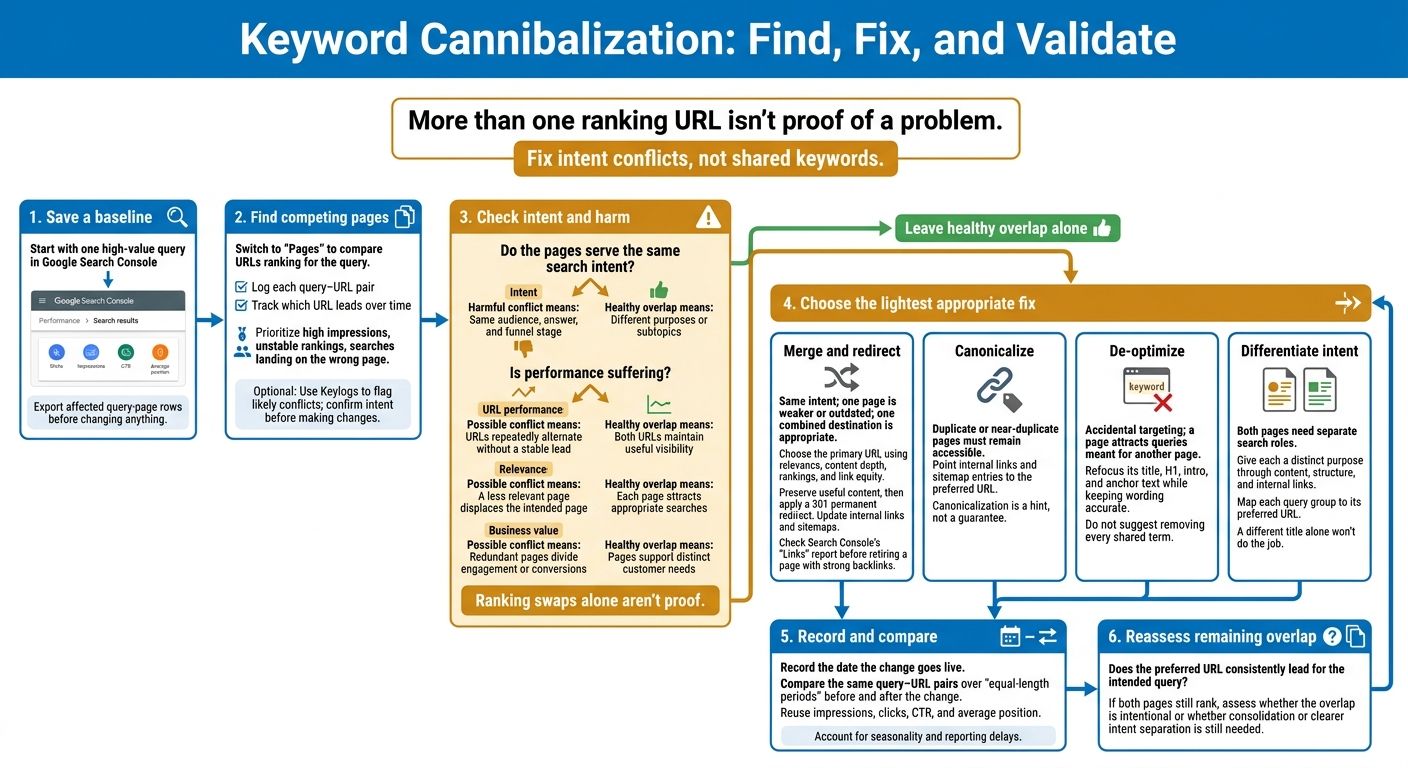
Keyword Cannibalization: Why Your SEO Pages Compete (And How to Fix It)
Find Pages That May Be Competing
With your baseline in place, look for queries where more than one URL competes.
Filter Queries and Review Ranking Pages
In Performance → Search results, turn on clicks, impressions, CTR, and average position. Start with queries that have high impressions, unstable rankings, or searches that land on the wrong page.
Then switch to Pages. Compare the URLs ranking for each query and check whether they serve the same intent. Log each query–URL pair so you can track which URL leads over time.
| Query | URL | Intent | Impressions | Clicks | CTR | Average position | Ranking stability |
|---|
Check for Harmful Conflicts or Healthy Overlap
Recommend consolidation only when intent matches and performance suffers. URLs swapping positions can point to a problem, but that alone isn't proof. Check whether the intended page loses clicks or visibility when another page takes the lead.
| Evidence | Possible harmful conflict | Healthy overlap |
|---|---|---|
| Intent | Same audience, answer, and funnel stage | Different purposes or subtopics |
| URL performance | URLs repeatedly alternate without a stable lead | Both URLs maintain useful visibility |
| Relevance | A less relevant page displaces the intended page | Each page attracts appropriate searches |
| Business value | Redundant pages divide engagement or conversions | Pages support distinct customer needs |
If a query keeps flipping between URLs, add it to your priority list. Move only the highest-value conflicts to the fix stage.
Prioritize Conflicts With Keylogs
Use the checker to flag likely conflicts in Search Console data. Review the highest-impact findings first, then confirm that the pages serve the same intent before making changes.
Choose the Right Fix
Once you’ve confirmed harmful conflict - not healthy overlap - keep the best landing page. Choose the lightest fix that fits the problem: merge pages that answer the same intent, canonicalize near-duplicates, reduce accidental targeting, or separate intent when each page needs its own role.
| Fix | Content similarity | User/technical need | GSC data signal | Appropriate use case |
|---|---|---|---|---|
| Merge and redirect | High | One combined destination | Two URLs split clicks and keep swapping positions | Same intent; one page is weaker or outdated |
| Canonicalize | High | Duplicate pages must stay live | Two URLs split clicks and keep swapping positions | Duplicate or near-duplicate versions must remain accessible |
| De-optimize | Partial | A page has a separate primary goal | One page attracts queries meant for another page | Accidental targeting |
| Differentiate intent | Partial | Both pages need separate search roles | Each page serves a different intent | Different purposes call for separate pages |
| No change | Low | Both pages are useful as-is | Stable, distinct rankings or sitelinks | Shared terms without harmful conflict |
Merge Content and Redirect Retired URLs
Choose the primary URL based on relevance, content depth, rankings, and link equity. Before retiring a page with strong backlinks, check Search Console’s Links report.
Move useful material that isn’t already on the destination page into it. Then set up a 301 permanent redirect from the retired URL to the preferred page. Update internal links and sitemaps to point to that destination.
Canonicalize Duplicate Pages
Use a canonical link for duplicate or near-duplicate pages that must stay live, such as printer-friendly versions, product variants, or ad landing pages.
Point internal links and sitemap entries to the preferred URL. Canonicalization is a hint, not a guarantee: Google may choose a different canonical. Don’t use it for pages with different content.
Reduce Accidental Targeting or Separate Intent
For accidental targeting, remove repeated terms from the secondary page’s title, H1, intro, and anchor text. Keep the wording accurate - you don’t need to remove every shared term. Refocus the page on its own purpose, and point relevant internal links toward the intended landing page.
If both pages deserve search visibility, give each a separate purpose through its content, structure, and internal links. A different title alone won’t do the job. Map each query group to its preferred URL. If you can’t give each page something different to offer, merge them instead. Track the same query–URL pairs in your next Search Console check.
Check Results in Search Console
Save a Baseline and Check Your Changes
Before the change, export the affected query-page rows with impressions, clicks, CTR, and average position. Record the date the change goes live. Once the fix is live, return to those same query-page pairs to check the results. You can also fix site errors with Keylogs to ensure your data remains accurate during the validation phase.
Compare Matching Before-and-After Periods
Once Search Console has new data, compare it with your baseline using equal-length periods before and after the change. Keep the query-page set the same, and account for seasonality and reporting delays.
Review impressions, clicks, CTR, and average position for each matching query and URL pair to assess whether the fix worked.
Review Pages That Still Rank Together
Check whether the preferred URL now consistently leads for the query. The goal is for one page to serve the search intent rather than have both pages compete.
If both pages still rank for the same query, decide whether that overlap is intentional or whether you still need to consolidate the pages or separate their focus.
Conclusion: Fix Intent Conflicts, Not Shared Keywords
Shared keywords are a signal, not a verdict. Before changing anything, use query-to-page data to check whether pages serve the same intent, swap ranking positions, and hurt performance.
Choose the least disruptive fix: merge pages that serve the same intent and 301 redirect the retired URL, canonicalize duplicate versions, reduce accidental targeting, or separate pages with different intents. Then validate the fix against the same baseline.
Start with one high-value query in Google Search Console, or run a scan to find the highest-impact conflict and a recommended fix. Document the competing URLs, supporting evidence, preferred page, and planned fix. After making the change, compare the results with your saved baseline.
FAQs
How much data do I need to confirm keyword cannibalization?
Use the last 3 months of Google Search Console data to spot a trend. Don’t rely on a single noisy week.
Look for two or more pages that each receive roughly 20% or more of the impressions for the same query, with average positions of 30 or better. Then check whether those pages swap ranking positions over time. If their positions stay stable and separate, you’re winning twice - not cannibalizing.
How long should I wait to evaluate a cannibalization fix?
Wait two to four weeks before evaluating the fix. Track the query in Google Search Console to check whether pages stop trading rankings and one URL consistently holds the position.
If the conflict continues after three to four weeks, review your implementation. Check that your 301 redirect or canonical tag works correctly, and allow a full month before judging the final outcome.
What if my preferred page loses traffic after merging?
If your preferred page loses traffic after a merge, the pages may not have had a cannibalization conflict. Before merging, check that the two pages split impressions and trade ranking positions over time.
If one page was already winning, or both held steady at different positions, a merge can hurt a page that was bringing in traffic. Confirm the conflict before making changes.