How to Check for Keyword Cannibalization: A Free Audit
Two honest ways to check for keyword cannibalization — the manual Google Search Console method, and the faster automated audit.
· 6 min read
On this page
Before you merge, redirect, or rewrite anything, you have to know which pages are actually clashing — and whether they're clashing at all. This guide is the audit step: how to check for keyword cannibalization on your own site, confirm a clash is real, and separate it from the harmless double-rankings that look identical at a glance.
There are two honest ways to do it. The manual method uses Google Search Console and nothing else — it's free, accurate, and worth knowing even if you never touch a tool. The fast method runs the same analysis across every query at once. I'll cover both, and I won't pretend the manual one is useless just to sell you the shortcut. It works. It's just slow.
What a real clash looks like (so you know what you're checking for)
Keyword cannibalization is two of your pages competing for the same query, splitting the clicks and signals that should stack onto one URL. (If the concept is new, start with what keyword cannibalization is.) The trap is that not every case of two URLs appearing for one query is a clash. A cannibalization audit is really an exercise in telling two patterns apart:
- A real clash has a balanced impression split (each page pulling a meaningful share, say 20%+ of the query's impressions) and volatility — the two pages trade places over time, neither settling. That flip-flop is the signature.
- A harmless double-ranking has stable, distinct positions (a firm 3 and a firm 9 that don't move) or a lopsided split (one page takes almost everything, the other gets a handful of impressions Google is just testing). Occupying two slots on page one is winning twice, not cannibalizing.
Everything below is about spotting the first pattern without getting fooled by the second.
How to check for keyword cannibalization in Google Search Console
This is the manual keyword cannibalization audit. It's the one to learn first because it reads your true impression data — the ground truth every rank tracker only estimates.
1. Open the Performance report
Go to Performance → Search results. Set the date range to the last 3 months so there's enough data to see a trend rather than one noisy week, and make sure the Average position and Total impressions toggles are switched on above the chart.
One caveat to keep in mind the whole way through: the average position Search Console shows is exactly that — an average across every impression in the range. Two pages can each show an average of 9 without ever having ranked side by side on the same day. That's why the trend over time matters more than any single number.
2. Pick a suspect query
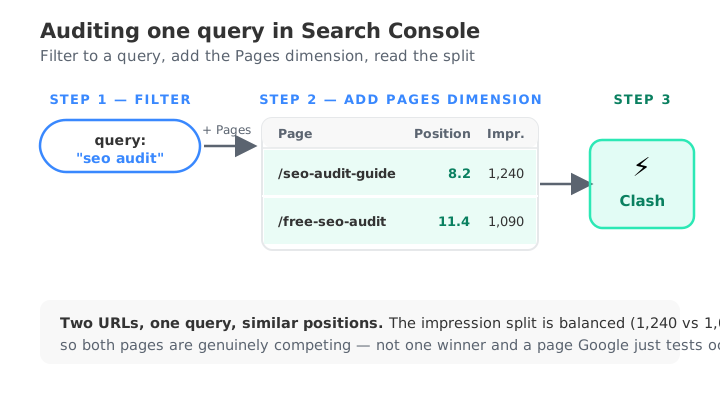
Open the Queries tab and sort by impressions. You're hunting for a query where you feel more than one of your pages should be eligible — a topic you've written about more than once. Click that query. This filters the entire report down to just that search term. Everything you do next is scoped to it.
3. Add the Pages dimension
With the query filter still applied, switch to the Pages tab. This is the whole audit in one move. If a single page owns the query, you'll see exactly one URL. If you're cannibalizing, you'll see two or more URLs both pulling impressions for that one query. Note each page's average position — if two of them sit at position ≤ 30, you've got a candidate clash worth investigating further.
4. Check the impression split
A candidate isn't a confirmed clash yet. Look at how the impressions divide between the two URLs. A real fight is roughly balanced — each page capturing a meaningful share. If one page has 4,000 impressions for the query and the other has 30, that's not cannibalization; it's one clear winner and a page Google occasionally tests. Leave those alone. You're only interested in pairs where both pages are genuinely earning visibility.
5. Confirm the flip-flop over time
This is the step most people skip, and it's the one that separates a real clash from a stable double-ranking. Search Console has no pivot view that charts two pages against each other, so check the trend directly: keep the query filter on, stay in the Pages tab, and step the date range week by week (or compare two adjacent date ranges) watching which URL leads.
If the leader keeps switching — page A ahead one week, page B the next — that volatility is the cannibalization signature. If the two pages hold steady, distinct positions the whole time, they're not cannibalizing; they're ranking twice, and you should leave them be.
Repeat that for every suspect query. It works. But notice what it costs: you have to guess the query first, then filter, then eyeball the split, then step through the dates — one query at a time. On a small site that's an afternoon. On a real content library with hundreds of ranking queries, checking them all by hand isn't realistic, and the ones you never think to check are exactly the clashes you'll miss.
The faster method: run an automated audit
The shortcut is to let a tool do that same pass across your entire property at once. The free keyword cannibalization checker reads your Search Console data directly, finds every query where two or more pages capture real impression share, scores the flip-flop volatility for each, and — the part that matters most — suppresses the false positives the manual method trips over: sitelinks, locale alternates, brand queries, and stable double-rankings. It surfaces only the clashes where the signal is genuinely split.
It's the same analysis you'd do by hand in step 3 through 5 — the balanced split, the similar positions, the switching leader — applied to every query instead of the handful you happened to suspect, and read off your own impression data rather than a crawler's estimate. That's the honest pitch: not a different method, just the manual one run exhaustively and without the false positives. If you'd rather not spend the afternoon, that's the reason to use a keyword cannibalization tool instead. Weighing your options first? Compare the free tools to see how each one handles the impression split.
If you already pay for a rank tracker, you can also check for the same clashes in Ahrefs or Semrush — just remember those tools read crawl-based rank data, not your true impressions, so you'll still want to confirm any candidate against Search Console.
What to do once you've found a clash
Finding the clash is the audit. Fixing it is a separate decision — and the wrong fix can demote a page that was earning traffic. Once you've confirmed a genuine, flip-flopping clash, run it through the five resolutions (merge and redirect, canonical, de-optimize, differentiate intent, or leave it alone) in the guide to finding and fixing keyword cannibalization. For clashes between two of your own pages specifically, internal keyword cannibalization goes deeper on the signals.
Then make the audit a habit. Content libraries drift — pages you wrote for one purpose slowly start ranking for another. Re-check quarterly, or after any big publishing push, so you catch new clashes while they're small and a single edit fixes them, before they've split months of accumulated authority across two pages that could have been one.
Check your site free